
 Download IVISION Catalog
 01
01Observe the access route
Cover the threshold and accessible floor around the equipment area.


An animal entering an equipment room or service enclosure may require a specialist check. A validated camera workflow can identify a candidate access event while leaving equipment condition and any damage assessment to qualified personnel.
Confirm detector support, camera suitability and the proposed event workflow before deployment.
Plan sensitive-site coverage
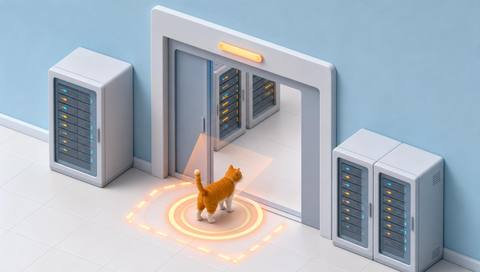
 Without IVISIONStandard CCTV feed
 With IVISIONIllustrative event overlay
The Process
Give the right team a location to inspect Help qualified teams inspect sensitive locations after a visible animal sighting.
01Cover the threshold and accessible floor around the equipment area.
 02
02Validate detections for animal types and sizes that may appear there.
 03
03Review the image and camera context before treating it as an intrusion.
 04
04Use the facility procedure for safe entry and equipment inspection.
Explore Your Options
| Dimension |  animals entering sensitive facilities animals entering sensitive facilities |  animals entering restricted areas animals entering restricted areas |
|---|---|---|
| Observation |  An animal visible at a monitored equipment-area access point. An animal visible at a monitored equipment-area access point. | An animal visible across or inside a designated image boundary. |
| Event criteria | A supported animal observation occurs inside the designated facility zone. | A supported animal observation meets the validated crossing or presence criteria. |
| Monitoring setup | Agree the sensitive boundary and the qualified response contact. | Agree boundary geometry, entry direction and when the area is restricted. |
| What it cannot establish | A camera cannot reveal hidden pests, internal equipment damage or electrical safety. | An image boundary does not physically prevent entry or establish why the animal entered. |
| Practical outcome | Help qualified teams inspect sensitive locations after a visible animal sighting. | Prioritize checks when an animal appears inside a controlled part of the site. |
Illustrative demonstration
Example footage and simulated events explain the review workflow. They do not measure detector performance.
 Sites overview
No matching events.
 Animal Detection
Define the controlled zone surrounding sensitive equipment.
Read More
 Animal Detection
Review a supported animal category before selecting a site response.
Read More Animal Detection
Inspect visible door position around an animal access event.
Read MoreEXPLORE WHAT’S POSSIBLE
01 / 04 · ANIMALS ENTERING SENSITIVE FACILITIES
Animal access near energized equipment needs specialist review.
Example event: An animal appears inside the visible threshold.
Operator response: Ask authorized personnel to assess access and equipment safely.
Practical value: Direct a qualified inspection to the correct room.
Discuss this capability02 / 04 · ANIMALS ENTERING SENSITIVE FACILITIES
Open maintenance access may admit animals.
Example event: A candidate sighting occurs within the service doorway.
Operator response: Verify the event and inspect the entry route.
Practical value: Support an access-condition review.
Discuss this capability03 / 04 · ANIMALS ENTERING SENSITIVE FACILITIES
Unexpected animals may enter through delivery access.
Example event: An animal is visible beside the storage entrance.
Operator response: Inspect the store and follow the local incident procedure.
Practical value: Document where the access concern arose.
Discuss this capability04 / 04 · ANIMALS ENTERING SENSITIVE FACILITIES
Avoid placing cameras where equipment blocks low-level access routes.
Visibility: Dark corners and enclosed machinery remain outside visible coverage.
Configuration: Validate supported classes and permitted camera placement with facility specialists.
Privacy: Restrict technical-area footage to authorized personnel.
Human review: Qualified staff determine equipment condition and safe access.
Discuss this capabilityFrequently asked questions
Surface candidate animal access to camera-covered service or equipment areas.
No. Hidden spaces require appropriate physical inspection or dedicated sensing.
An animal sighting does not establish damage; qualified inspection is necessary.
Follow the facility’s access and electrical safety procedures, regardless of the camera observation.
Coverage depends on obstructions and target size. Survey each access route and blind spot.
Find your fit
Help qualified teams inspect sensitive locations after a visible animal sighting. For Critical-facility managers, Maintenance supervisors.
Workflow to discuss
animals entering sensitive facilities + Focus inspections on a monitored sensitive location.
Discuss a camera view, a monitoring question and the review process your team needs.





