Download IVISION Catalog
 01
01Prepare the view
Define permitted areas and staff association data.


Staff association and camera coverage determine what this metric can show. Validate the classification method and limit use to an agreed operational purpose; off-camera work and breaks are not evidence of absence or poor performance.
Catalog workflow. Confirm detector availability, permitted use and event delivery for the proposed deployment. Website examples are illustrative.
Assess employee occupancy

 Without IVISIONStandard CCTV feed
 With IVISIONIllustrative event overlay
The Process
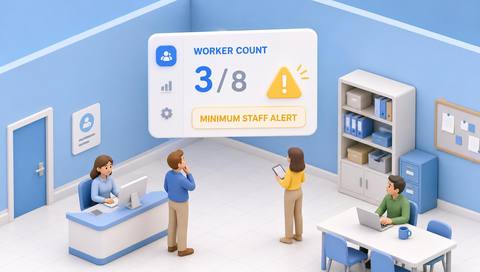
An occupancy estimate is not attendance or productivity Compare workforce presence with space requirements.
01Define permitted areas and staff association data.
 02
02Validate classification and area counting.
 03
03Review estimates with task and roster context.
 04
04Use aggregate findings for space or coverage planning.
Explore Your Options
| Dimension |  Employee occupancy tracking Employee occupancy tracking |  Smart Attendance Smart Attendance |
|---|---|---|
| Observation |  Observations associated with employees in a defined area. Observations associated with employees in a defined area. | A timestamped capture linked or proposed to an employee. |
| Event criteria | A supported method updates the staff-presence estimate. | An arrival or departure observation enters the record flow. |
| Monitoring setup | Confirm employee source, areas, time periods and exclusions. | Validate direction, shift boundaries and duplicate handling. |
| What it cannot establish | Cannot establish hours worked, productivity or complete whereabouts. | Camera presence does not establish hours worked or productivity. |
| Practical outcome | Help teams understand where workforce presence is concentrated. | Reconcile questionable attendance entries before approval. |
Illustrative demonstration
Example footage and simulated events explain the review workflow. They do not measure detector performance.
 Sites overview
No matching events.
EXPLORE WHAT’S POSSIBLE
01 / 04 · EMPLOYEE OCCUPANCY TRACKING
Staff use multiple rooms.
Example event: One area shows low employee presence.
Operator response: Review bookings and offsite work.
Practical value: Informs space planning.
Discuss this capability02 / 04 · EMPLOYEE OCCUPANCY TRACKING
Teams rotate between stations.
Example event: Presence shifts between areas.
Operator response: Compare the rotation plan.
Practical value: Explains staffing distribution.
Discuss this capability03 / 04 · EMPLOYEE OCCUPANCY TRACKING
Drivers and employees mix.
Example event: Staff estimate conflicts with total occupancy.
Operator response: Check classification sources.
Practical value: Improves metric quality.
Discuss this capability04 / 04 · EMPLOYEE OCCUPANCY TRACKING
Cover agreed work areas only.
Visibility: Partitions hide occupied positions.
Configuration: Verify staff association and authorized use.
Privacy: Restrict access and favor aggregate outputs.
Human review: Consult task owners before interpreting low presence.
Discuss this capabilityFrequently asked questions
Estimates employee presence within selected monitored areas using a verified staff association method.
No. Attendance and work-time interpretation are separate.
Only through a separately verified data source; camera visibility alone cannot.
Not for every aggregate planning question; minimize identity data.
No. Work may occur elsewhere.
Find your fit
Help teams understand where workforce presence is concentrated. For Workplace planners, Shift coordinators.
Workflow to discuss
Employee occupancy tracking + Separate staff presence from footfall.
Discuss a camera view, a monitoring question and the review process your team needs.