
 Download IVISION Catalog
 01
01Prepare the view
Map the camera view to the intended spatial regions.


Presence density, passage frequency and dwell time produce different maps. Choose the metric and period explicitly, validate coverage, and compare like-for-like views before drawing layout conclusions.
Catalog workflow. Confirm detector availability, permitted use and event delivery for the proposed deployment. Website examples are illustrative.
Assess traffic heatmaps
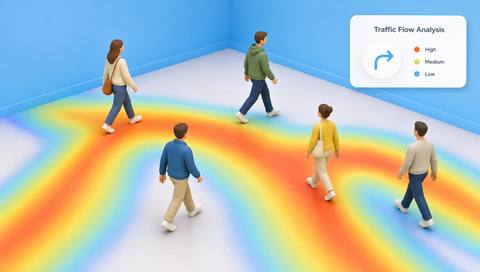
 Without IVISIONStandard CCTV feed
 With IVISIONIllustrative event overlay
The Process
A heatmap reflects its measurement method Make movement patterns easier to inspect.
01Map the camera view to the intended spatial regions.
 02
02Validate the selected aggregate metric.
 03
03Review patterns with coverage and time-period context.
 04
04Inspect the physical area before testing layout changes.
Explore Your Options
| Dimension |  Heatmap & Traffic Flow Analysis Heatmap & Traffic Flow Analysis |  Crowd-density mapping & analysis Crowd-density mapping & analysis |
|---|---|---|
| Observation |  Aggregated tracks or occupancy across visible regions. Aggregated tracks or occupancy across visible regions. | Estimated concentration of people in spatial regions. |
| Event criteria | A supported method accumulates a specified movement metric. | A supported density method identifies a region meeting a validated criterion. |
| Monitoring setup | Confirm metric, period, normalization and camera alignment. | Confirm map area, calibration, aggregation and thresholds. |
| What it cannot establish | Cannot explain motives or represent unseen areas. | Cannot certify safe crowd pressure or visibility of every person. |
| Practical outcome | Help planners compare busy routes and underused areas. | Help operators locate uneven crowd distribution. |
Illustrative demonstration
Example footage and simulated events explain the review workflow. They do not measure detector performance.
 Sites overview
No matching events.
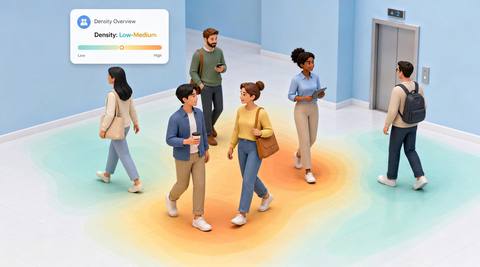 People Counting
Review current concentration instead of accumulated movement.
Read More
 People Counting
Compare route intensity with explicit coverage.
Read More People Counting
Distinguish stationary duration from movement frequency.
Read MoreEXPLORE WHAT’S POSSIBLE
01 / 04 · HEATMAP & TRAFFIC FLOW ANALYSIS
Displays redirect circulation.
Example event: A passage heatmap shifts.
Operator response: Compare equivalent trading periods.
Practical value: Supports layout evaluation.
Discuss this capability02 / 04 · HEATMAP & TRAFFIC FLOW ANALYSIS
Presence and movement are confused.
Example event: One region shows long dwell but little traffic.
Operator response: Review the chosen metric.
Practical value: Prevents misleading space conclusions.
Discuss this capability03 / 04 · HEATMAP & TRAFFIC FLOW ANALYSIS
A detour increases route use.
Example event: Traffic concentrates on an alternative path.
Operator response: Check the obstruction or change.
Practical value: Explains flow redistribution.
Discuss this capability04 / 04 · HEATMAP & TRAFFIC FLOW ANALYSIS
Keep geometry stable across comparisons.
Visibility: Blind spots create apparent low-use regions.
Configuration: Verify aggregation and normalization.
Privacy: Prefer anonymous aggregate maps.
Human review: Check site conditions before attributing cause.
Discuss this capabilityFrequently asked questions
Aggregates observed movement or presence into spatial patterns over a defined period.
No. It represents the selected metric’s relative intensity.
Only with compatible durations, scales and coverage.
No. The area may be poorly observed.
That is a separate identity-tracking function and is not required for aggregate analysis.
Find your fit
Help planners compare busy routes and underused areas. For Space planners, Operations analysts.
Workflow to discuss
Heatmap & Traffic Flow Analysis + Compare spatial movement patterns.
Discuss a camera view, a monitoring question and the review process your team needs.





