Download IVISION Catalog
 01
01Camera input
Capture enough of the vehicle body for classification.


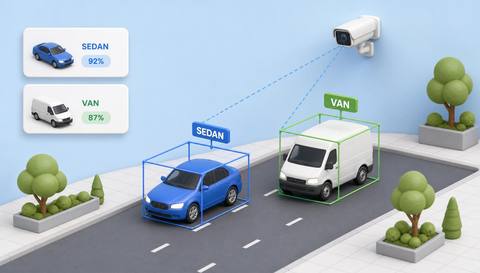
Agree which categories matter to the site and test ambiguous vehicles against those definitions. Classification can support traffic summaries, but body appearance does not prove load, ownership or exact model.
Catalog workflow. Detector availability, scene suitability and event delivery must be verified for the proposed deployment. Camera observations supplement human review and established safety procedures.
Discuss this workflow
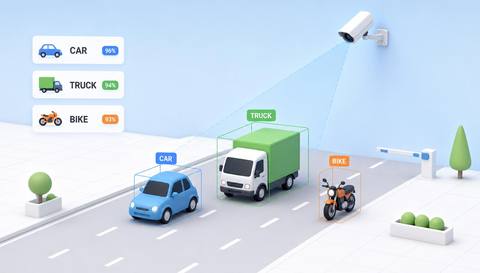
 Without IVISIONStandard CCTV feed
 With IVISIONIllustrative event overlay
The Process
Broad categories need a validated local definition Make traffic-category reports meaningful.
01Capture enough of the vehicle body for classification.
 02
02Validate categories with local vans, trucks and unusual vehicles.
 03
03Review uncertain labels and representative examples.
 04
04Analyst uses qualified categories in traffic summaries.
Explore Your Options
| Dimension |  Vehicle Classification Vehicle Classification |  Vehicle-Type Identification Vehicle-Type Identification |
|---|---|---|
| Observation |  Visible vehicle features match a supported broad class. Visible vehicle features match a supported broad class. | Visible body features match a validated type label. |
| Event criteria | A validated category indication is available for a detected vehicle. | The supported type criterion is met with adequate detail. |
| Monitoring setup | Define category boundaries and ambiguous-case handling. | Confirm the exact taxonomy, unknown handling and view requirements. |
| What it cannot establish | Appearance cannot establish payload, legal vehicle class or exact specification. | Exact model, year and mechanical specification are not established without separate evidence. |
| Practical outcome | Help teams review traffic mix without claiming exact make or model recognition. | Help teams evaluate whether a required vehicle distinction is visually supportable. |
Illustrative demonstration
Example footage and simulated events explain the review workflow. They do not measure detector performance.
 Sites overview
No matching events.
EXPLORE WHAT’S POSSIBLE
01 / 04 · VEHICLE CLASSIFICATION
Cars and heavy vehicles need different planning.
Example event: A passage receives a broad class.
Operator response: Manager reviews category totals.
Practical value: Better traffic-mix context.
Discuss this capability02 / 04 · VEHICLE CLASSIFICATION
Delivery vans resemble passenger vehicles.
Example event: A vehicle has an uncertain label.
Operator response: Operator reviews the view.
Practical value: More careful classification.
Discuss this capability03 / 04 · VEHICLE CLASSIFICATION
Special-purpose vehicles do not fit simple categories.
Example event: An unusual vehicle appears.
Operator response: Team checks category definitions.
Practical value: Clearer reporting boundaries.
Discuss this capability04 / 04 · VEHICLE CLASSIFICATION
Show side or oblique body features.
Visibility: Partial views and trailers complicate labels.
Configuration: Validate the supported taxonomy and unknown category.
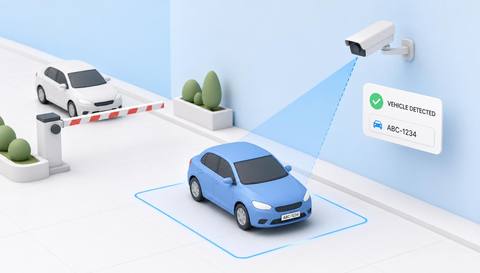
Privacy: Avoid collecting identity when aggregates suffice.
Human review: Confirm unusual or consequential classifications.
Discuss this capabilityFrequently asked questions
Assigns detected vehicles to broad supported visual categories such as cars, vans or trucks.
Not as part of broad classification.
No. Body type does not establish payload.
Use reviewed or unknown outcomes rather than forcing a category.
Only after the classification and commercial process are separately validated.
Find your fit
Help teams review traffic mix without claiming exact make or model recognition. For Transport operations analysts, Site access planners.
Workflow to discuss
Vehicle Classification + Separate broad class from exact model.
Discuss a camera view, a monitoring question and the review process your team needs.