Download IVISION Catalog
 01
01Prepare the view
Reconcile camera identifiers with the physical installation.


A camera map should connect an identifier to a verified physical location. Confirm orientation and field of view separately; a marker alone cannot show blind spots, current obstructions or whether a stream is working.
Catalog workflow. Confirm detector availability, permitted use and event delivery for the proposed deployment. Website examples are illustrative.
Assess camera-map records
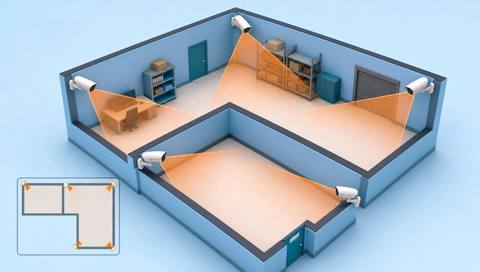
 Without IVISIONStandard CCTV feed
 With IVISIONIllustrative event overlay
The Process
Position is not the same as complete coverage Find the right camera for a location question.
01Reconcile camera identifiers with the physical installation.
 02
02Validate map placement and orientation records.
 03
03Link the marker to the verified source view where supported.
 04
04Check the actual image before relying on coverage.
Explore Your Options
| Dimension |  Camera-location maps Camera-location maps |  Interactive facility maps Interactive facility maps |
|---|---|---|
| Observation |  A registered camera associated with a plan location. A registered camera associated with a plan location. | A selected floor, area or map-linked source. |
| Event criteria | A user selects a camera marker or map-linked event. | A user chooses a mapped location or associated record. |
| Monitoring setup | Confirm camera ID, floor, position and orientation. | Confirm plan version, floor labels and linked data. |
| What it cannot establish | Cannot prove current coverage, stream availability or precise object location. | Does not itself detect people, route movement or certify safe access. |
| Practical outcome | Help operators identify the source of a view or event. | Help users understand where an observation belongs. |
Illustrative demonstration
Example footage and simulated events explain the review workflow. They do not measure detector performance.
 Sites overview
No matching events.
EXPLORE WHAT’S POSSIBLE
01 / 04 · CAMERA-LOCATION MAPS
Camera names are ambiguous.
Example event: An event references an unfamiliar ID.
Operator response: Locate and verify its physical position.
Practical value: Speeds source orientation.
Discuss this capability02 / 04 · CAMERA-LOCATION MAPS
A camera moves after refurbishment.
Example event: Its map marker is outdated.
Operator response: Update the inventory and plan.
Practical value: Keeps location context accurate.
Discuss this capability03 / 04 · CAMERA-LOCATION MAPS
Equipment blocks part of the view.
Example event: A marker suggests coverage that is obscured.
Operator response: Inspect the live view and obstruction.
Practical value: Separates location from visibility.
Discuss this capability04 / 04 · CAMERA-LOCATION MAPS
Record actual installation and orientation.
Visibility: Markers do not show every occlusion.
Configuration: Verify map links and source availability.
Privacy: Restrict detailed security layouts appropriately.
Human review: Check the image before claiming an area is covered.
Discuss this capabilityFrequently asked questions
Places known camera positions and labels within a maintained facility plan.
No. Stream status is separate.
Only with validated orientation and geometry data.
Update the map and revalidate related zones.
No. It locates the observation source.
Find your fit
Help operators identify the source of a view or event. For Camera administrators, Facility security teams.
Workflow to discuss
Camera-location maps + Connect IDs to physical locations.
Discuss a camera view, a monitoring question and the review process your team needs.