Download IVISION Catalog
 01
01Camera input
Choose views that show the selected cue clearly.


Choose a concrete supported cue, such as visible flame, a person down or an obstructed escape route. Agree who verifies it and what procedure applies instead of promising universal emergency detection.
Catalog workflow. Detector availability, scene suitability and event delivery must be verified for the proposed deployment. Camera observations supplement human review and established safety procedures.
Discuss this workflow
 Without IVISIONStandard CCTV feed
 With IVISIONIllustrative event overlay
The Process
An emergency label needs an observable basis Give each indication a defined review path.
01Choose views that show the selected cue clearly.
 02
02Validate each cue separately, not a universal emergency score.
 03
03Review evidence and identify the applicable procedure.
 04
04Trained personnel verify and respond through the established chain.
Explore Your Options
| Dimension |  Emergency Situation Detection Emergency Situation Detection |  Fire Detection Fire Detection |
|---|---|---|
| Observation |  A selected visible cue with agreed operational meaning. A selected visible cue with agreed operational meaning. | Flame-like shapes and movement in the scene. |
| Event criteria | The validated cue meets its event criterion. | A validated visual fire criterion is met. |
| Monitoring setup | Specify cue types, context and response owners. | Validate scene exclusions and review thresholds. |
| What it cannot establish | Video cannot establish every emergency or diagnose medical conditions. | Hidden combustion remains unseen; cameras do not replace certified alarms. |
| Practical outcome | Route a specific observable indication to the appropriate response procedure. | Help operators locate and verify a possible visible fire indication. |
Illustrative demonstration
Example footage and simulated events explain the review workflow. They do not measure detector performance.
 Sites overview
No matching events.
EXPLORE WHAT’S POSSIBLE
01 / 04 · EMERGENCY SITUATION DETECTION
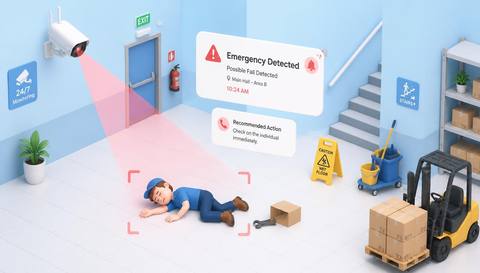
A person-down event needs a welfare check.
Example event: A person remains down in view.
Operator response: Security arranges assistance.
Practical value: Specific welfare routing.
Discuss this capability02 / 04 · EMERGENCY SITUATION DETECTION
Fire cues need a different response from access issues.
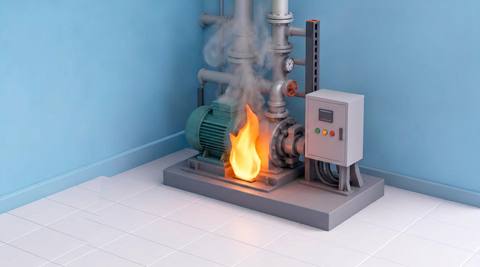
Example event: Flame-like imagery appears.
Operator response: Operator follows the fire procedure.
Practical value: Correct response context.
Discuss this capability03 / 04 · EMERGENCY SITUATION DETECTION
Obstructions affect readiness.
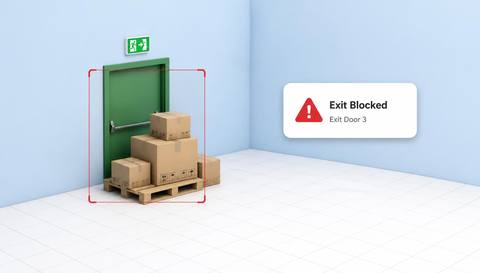
Example event: The assessed route becomes blocked.
Operator response: Facilities verifies and clears it safely.
Practical value: Focused readiness follow-up.
Discuss this capability04 / 04 · EMERGENCY SITUATION DETECTION
Position for the selected cue.
Visibility: Crowding and blind spots limit evidence.
Configuration: Confirm each analytic and response integration.
Privacy: Restrict welfare and incident footage.
Human review: Qualified people determine urgency and action.
Discuss this capabilityFrequently asked questions
Brings explicitly defined visual incident cues into an emergency review workflow.
No. Only explicitly selected, validated cues should be claimed.
No. A person-down indication calls for a welfare check.
Verify delivery and escalation for the deployment.
The cue, reviewer, response procedure and uncertainty handling.
Find your fit
Route a specific observable indication to the appropriate response procedure. For Emergency coordinators, Control-room supervisors.
Workflow to discuss
Emergency Situation Detection + Tie indications to defined procedures.
Discuss a camera view, a monitoring question and the review process your team needs.