Download IVISION Catalog
 01
01Camera input
Identify the source observations and authorized metadata.


Define which supported fields are stored, how they link to source evidence and who may access them. A record may contain uncertain visual observations; storage does not make those observations verified facts.
Catalog workflow. Detector availability, scene suitability and event delivery must be verified for the proposed deployment. Camera observations supplement human review and established safety procedures.
Discuss this workflow
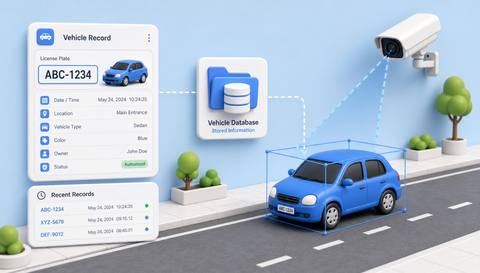
 Without IVISIONStandard CCTV feed
 With IVISIONIllustrative event overlay
The Process
Stored data needs a clear purpose and retention rule Preserve context without treating every label as confirmed identity.
01Identify the source observations and authorized metadata.
 02
02Validate field mapping and links to available evidence.
 03
03Review records with uncertainty and correction context.
 04
04Administrator applies access, retention and correction procedures.
Explore Your Options
| Dimension |  Vehicle Information Storage Vehicle Information Storage |  Vehicle Entry and Exit Logging Vehicle Entry and Exit Logging |
|---|---|---|
| Observation |  Vehicle observations and metadata supplied by a supported workflow. Vehicle observations and metadata supplied by a supported workflow. | A vehicle crosses a designated entry or exit boundary. |
| Event criteria | A configured process creates or updates an authorized record. | A validated directional crossing creates an available event record. |
| Monitoring setup | Confirm fields, correction handling, access and retention. | Confirm point names, direction and timestamp handling. |
| What it cannot establish | Storage does not prove recognition accuracy or unlimited search coverage. | Missed crossings or uncertain identity can prevent complete visit matching. |
| Practical outcome | Help authorized users retrieve relevant vehicle context under an agreed retention policy. | Help operators review access activity without assuming every entry has a correctly matched exit. |
Illustrative demonstration
Example footage and simulated events explain the review workflow. They do not measure detector performance.
 Sites overview
No matching events.
EXPLORE WHAT’S POSSIBLE
01 / 04 · VEHICLE INFORMATION STORAGE
Arrival evidence is scattered across sources.
Example event: A vehicle event links to available metadata.
Operator response: Coordinator reviews the relevant record.
Practical value: Clearer delivery context.
Discuss this capability02 / 04 · VEHICLE INFORMATION STORAGE
Visual labels may disagree with fleet records.
Example event: A stored observation needs correction.
Operator response: Administrator checks authoritative data.
Practical value: Better record quality.
Discuss this capability03 / 04 · VEHICLE INFORMATION STORAGE
Retention must match the review purpose.
Example event: A relevant event remains within policy.
Operator response: Authorized reviewer accesses it.
Practical value: Controlled evidence retrieval.
Discuss this capability04 / 04 · VEHICLE INFORMATION STORAGE
Retain only useful source views.
Visibility: Unreadable imagery limits stored data quality.
Configuration: Verify schema, search, corrections and retention implementation.
Privacy: Treat plates and linked movement data as sensitive operational records.
Human review: Confirm identity against authorized records before consequential action.
Discuss this capabilityFrequently asked questions
Organizes supported vehicle-related observations and associated metadata in reviewable records.
Confirm the deployed schema; do not assume every vehicle attribute is available.
No. Retention and storage configuration govern availability.
Verify the supported review and correction workflow.
No. A vehicle identifier does not identify the driver.
Find your fit
Help authorized users retrieve relevant vehicle context under an agreed retention policy. For Fleet record administrators, Security review teams.
Workflow to discuss
Vehicle Information Storage + Keep source and uncertainty with the record.
Discuss a camera view, a monitoring question and the review process your team needs.