
 Download IVISION Catalog
 01
01Prepare the view
Define comparable regions and their visible coverage.


A movement map can support route planning only when coverage is comparable. Validate the measure and identify blind spots before interpreting intensity differences or changing layout, staffing or access routes.
Catalog workflow. Confirm detector availability, permitted use and event delivery for the proposed deployment. Website examples are illustrative.
Assess traffic-intensity comparison

 Without IVISIONStandard CCTV feed
 With IVISIONIllustrative event overlay
The Process
Low observation is not proof of low use Separate movement patterns from coverage artifacts.
01Define comparable regions and their visible coverage.
 02
02Validate movement counts or track-based intensity.
 03
03Review busy/quiet patterns with blind spots indicated.
 04
04Inspect site conditions before testing route or layout changes.
Explore Your Options
| Dimension |  High-traffic and low-traffic area High-traffic and low-traffic area |  Heatmap & Traffic Flow Analysis Heatmap & Traffic Flow Analysis |
|---|---|---|
| Observation |  Different movement volumes across monitored regions. Different movement volumes across monitored regions. | Aggregated tracks or occupancy across visible regions. |
| Event criteria | Supported aggregation compares the agreed traffic measure. | A supported method accumulates a specified movement metric. |
| Monitoring setup | Confirm region size, period, normalization and coverage. | Confirm metric, period, normalization and camera alignment. |
| What it cannot establish | Cannot prove unused space, safety or the cause of movement differences. | Cannot explain motives or represent unseen areas. |
| Practical outcome | Help teams inspect busy routes and apparently quiet regions. | Help planners compare busy routes and underused areas. |
Illustrative demonstration
Example footage and simulated events explain the review workflow. They do not measure detector performance.
 Sites overview
No matching events.
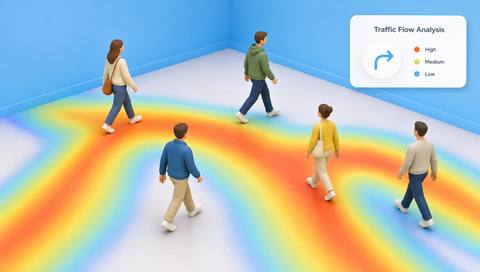 Tracking & Movement
Visualize the selected aggregate metric.
Read More
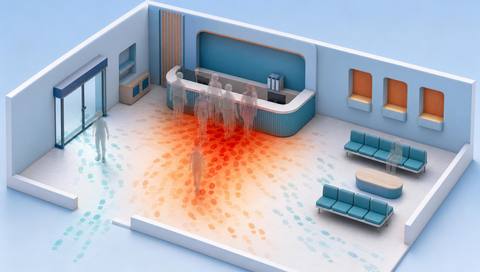 Tracking & Movement
Distinguish repeated visits from through-traffic.
Read More Tracking & Movement
Consider space purpose alongside movement.
Read MoreEXPLORE WHAT’S POSSIBLE
01 / 04 · HIGH-TRAFFIC AND LOW-TRAFFIC AREA
One camera misses an approach.
Example event: An aisle appears unusually quiet.
Operator response: Check coverage before rerouting traffic.
Practical value: Avoids false low-use conclusions.
Discuss this capability02 / 04 · HIGH-TRAFFIC AND LOW-TRAFFIC AREA
Meetings alter route demand.
Example event: One corridor becomes busier.
Operator response: Compare schedules and equivalent periods.
Practical value: Explains temporary change.
Discuss this capability03 / 04 · HIGH-TRAFFIC AND LOW-TRAFFIC AREA
Displays redirect shoppers.
Example event: Traffic intensity shifts between aisles.
Operator response: Inspect the layout and accessibility.
Practical value: Supports practical layout evaluation.
Discuss this capability04 / 04 · HIGH-TRAFFIC AND LOW-TRAFFIC AREA
Maintain stable views and mapped regions.
Visibility: Occlusion creates apparent quiet zones.
Configuration: Verify normalization and period selection.
Privacy: Use aggregate flow rather than individual profiling.
Human review: Confirm physical conditions and alternative explanations.
Discuss this capabilityFrequently asked questions
Compares observed movement intensity across defined areas using a consistent metric and period.
No. Coverage, purpose and peak demand matter.
Only with an appropriate consistent measure or normalization.
Not inherently; assess the actual environment and limits.
Schedule differences can dominate the observed pattern.
Find your fit
Help teams inspect busy routes and apparently quiet regions. For Facility planners, Traffic coordinators.
Workflow to discuss
High-traffic and low-traffic area + Compare consistent traffic measures.
Discuss a camera view, a monitoring question and the review process your team needs.





