
 Download IVISION Catalog
 01
01Confirm the reject record
Use the authoritative disposition and reason source.


A useful reject review begins with actual disposition records. Where images and identifiers are available, compare visible examples with the documented reasons and process conditions, without assuming that every visual anomaly was rejected or that a pattern proves its cause.
Confirm detector support, camera suitability and the proposed event workflow before deployment.
Plan a reject review

 Without IVISIONStandard CCTV feed
 With IVISIONIllustrative event overlay
The Process
Keep reject reasons tied to verified evidence Help quality teams connect documented dispositions with visible examples and process context.
01Use the authoritative disposition and reason source.
 02
02Verify any image, product identifier and observation-time connection.
 03
03Inspect representative examples and inconsistent reason labels.
 04
04Quality engineers test causes and corrective actions using appropriate evidence.
Explore Your Options
| Dimension |  Rejected-product analysis Rejected-product analysis |  Defective-product detection Defective-product detection |
|---|---|---|
| Observation |  Confirmed reject dispositions with available product images and context. Confirmed reject dispositions with available product images and context. | Visible finished-product features outside validated acceptable examples. |
| Event criteria | A reviewer groups verified records by documented reason or relevant process condition. | A supported defect observation meets the agreed review criteria. |
| Monitoring setup | Verify record linkage, reason definitions and review period. | Define product variants, visible defects and acceptance references. |
| What it cannot establish | Images alone do not establish that an item was rejected or identify the cause of a defect. | A visual pass does not establish internal condition, function or full specification compliance. |
| Practical outcome | Help quality teams connect documented dispositions with visible examples and process context. | Help final inspectors focus on items needing a closer acceptance check. |
Illustrative demonstration
Example footage and simulated events explain the review workflow. They do not measure detector performance.
 Sites overview
No matching events.
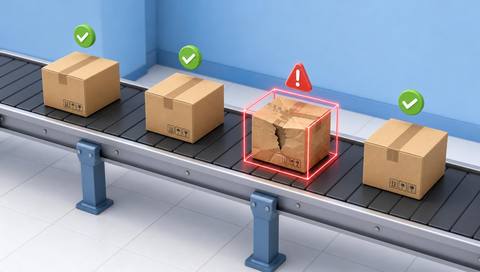 Production Monitoring
Provide candidate visible anomalies for final inspection.
Read More
 Production Monitoring
Distinguish label mismatches from read failures.
Read More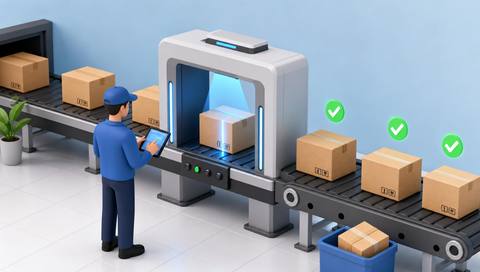 Production Monitoring
Keep dispositions connected to controlled acceptance criteria.
Read MoreEXPLORE WHAT’S POSSIBLE
01 / 04 · REJECTED-PRODUCT ANALYSIS
Reason labels may hide different visible conditions.
Example event: Confirmed rejects show several surface appearances.
Operator response: Review examples against the actual disposition criteria.
Practical value: Improve the focus of quality investigation.
Discuss this capability02 / 04 · REJECTED-PRODUCT ANALYSIS
Read failures and wrong labels can be mixed in records.
Example event: Verified cases contain different documented reasons.
Operator response: Separate uncertain reads from confirmed mismatches.
Practical value: Clarify the issue being addressed.
Discuss this capability03 / 04 · REJECTED-PRODUCT ANALYSIS
A recurring visible mismatch needs context.
Example event: Linked images show a repeated assembly condition.
Operator response: Check revision, material and process records before assigning cause.
Practical value: Support evidence-based corrective review.
Discuss this capability04 / 04 · REJECTED-PRODUCT ANALYSIS
Use inspection images that show the documented condition.
Visibility: Missing images and inconsistent labels limit conclusions.
Configuration: Verify disposition linkage and analysis tools; automatic root-cause reporting is not assumed.
Privacy: Protect product identifiers and confidential quality records.
Human review: Quality teams confirm classifications and causal explanations.
Discuss this capabilityFrequently asked questions
Review confirmed reject records and their available images to investigate recurring quality issues.
No. Only a confirmed disposition establishes rejection.
No. Process investigation and additional evidence are required.
Review and normalize them through the quality process before comparing trends.
Evaluate subsequent quality data and operating conditions, not image examples alone.
Find your fit
Help quality teams connect documented dispositions with visible examples and process context. For Quality engineers, Production improvement teams.
Workflow to discuss
Rejected-product analysis + Start from confirmed quality dispositions.
Discuss a camera view, a monitoring question and the review process your team needs.





