Download IVISION Catalog
 01
01Check the historical record
Confirm which periods and cameras have usable retained footage.


A sequence of retained views can reveal when a staging area fills or a shared space stays occupied. Confirm the available history and sampling method, then inspect the underlying footage before drawing conclusions from a time-based summary.
Confirm detector support, camera suitability and the proposed event workflow before deployment.
Plan historical zone review
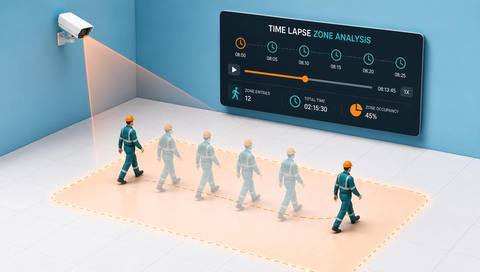
 Without IVISIONStandard CCTV feed
 With IVISIONIllustrative event overlay
The Process
Use historical observations to investigate recurring conditions Help teams review how visible zone use changes over time.
01Confirm which periods and cameras have usable retained footage.
 02
02Use consistent views and account for missing periods.
 03
03Review original footage where a summary suggests a meaningful change.
 04
04Compare the pattern with schedules and site records.
Explore Your Options
| Dimension |  Time Lapse Zone Analysis Time Lapse Zone Analysis |  Zone occupancy views Zone occupancy views |
|---|---|---|
| Observation |  Retained images or supported events from a defined area over time. Retained images or supported events from a defined area over time. | Supported presence or count observations associated with named zones. |
| Event criteria | A reviewer compares selected intervals or periods. | The available interface presents an updated state for each configured zone. |
| Monitoring setup | Verify retention, sampling, timestamps and the available review interface. | Verify zone definitions, refresh timing and unknown-state behavior. |
| What it cannot establish | Sampled views can miss short events and cannot establish continuous activity. | A displayed zone state is not proof of complete coverage, permission or safe capacity. |
| Practical outcome | Help teams review how visible zone use changes over time. | Help operators locate which monitored areas appear occupied. |
Illustrative demonstration
Example footage and simulated events explain the review workflow. They do not measure detector performance.
 Sites overview
No matching events.
EXPLORE WHAT’S POSSIBLE
01 / 04 · TIME LAPSE ZONE ANALYSIS
Teams need context for recurring congestion.
Example event: Retained views show changing visible occupancy.
Operator response: Compare the pattern with shipment schedules.
Practical value: Support a focused staging review.
Discuss this capability02 / 04 · TIME LAPSE ZONE ANALYSIS
Use varies through the workday.
Example event: Selected intervals show different visible activity.
Operator response: Check the sample against normal operating periods.
Practical value: Inform a space-use discussion.
Discuss this capability03 / 04 · TIME LAPSE ZONE ANALYSIS
Accumulation may vary by shift.
Example event: Historical views show repeated buildup at one period.
Operator response: Review production records before assigning a cause.
Practical value: Guide a targeted process investigation.
Discuss this capability04 / 04 · TIME LAPSE ZONE ANALYSIS
Keep camera framing comparable across the reviewed period.
Visibility: Lighting changes and missing recordings can distort apparent trends.
Configuration: Verify history access and sampling tools; automatic time-lapse generation is not assumed.
Privacy: Use an appropriate retention policy for historical imagery.
Human review: Check whether the selected sample represents the actual operating period.
Discuss this capabilityFrequently asked questions
Compare retained observations of a defined zone across selected times or intervals.
A time-lapse or interval review may sample observations and miss activity between them.
It can show visible changes; operational records are needed to investigate causes.
Only as far as usable records have been retained.
That depends on the verified review tools and is not established by this catalog workflow.
Find your fit
Help teams review how visible zone use changes over time. For Facilities planners, Operations analysts.
Workflow to discuss
Time Lapse Zone Analysis + Compare visible zone conditions across periods.
Discuss a camera view, a monitoring question and the review process your team needs.