Download IVISION Catalog
 01
01Camera input
Show the route and the relevant surface or clearance.


Select concrete observable conditions, such as an obstruction or wet-looking surface. Review each indication with route context; a camera cannot certify that an entire walkway is safe or accessible.
Catalog workflow. Detector availability, scene suitability and event delivery must be verified for the proposed deployment. Camera observations supplement human review and established safety procedures.
Discuss this workflow
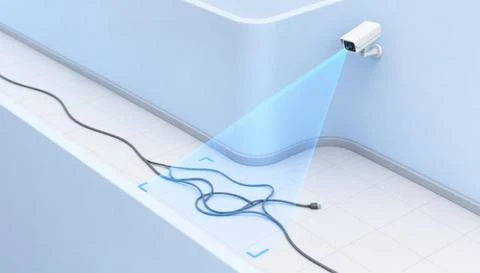
 Without IVISIONStandard CCTV feed
 With IVISIONIllustrative event overlay
The Process
Name the concern instead of assigning a safety score Make pedestrian-route follow-up specific and actionable.
01Show the route and the relevant surface or clearance.
 02
02Validate each chosen condition against normal route use.
 03
03Review what changed and which part of passage is affected.
 04
04Responsible team inspects and applies the appropriate route control.
Explore Your Options
| Dimension |  Unsafe Walkway Detection Unsafe Walkway Detection |  Obstacle Detection Obstacle Detection |
|---|---|---|
| Observation |  A selected visible condition appears within the walkway. A selected visible condition appears within the walkway. | An object occupies an assessed clearance region. |
| Event criteria | The validated condition meets its own review criterion. | A validated object indication meets the route-specific criterion. |
| Monitoring setup | Confirm route boundaries and each selected condition separately. | Confirm region, permitted transit and temporary staging exceptions. |
| What it cannot establish | Structural strength, traction and full accessibility are not established visually. | Video alone cannot determine every required clearance or object hazard. |
| Practical outcome | Help facilities review the particular condition affecting pedestrian passage. | Help area owners locate objects that may obstruct intended movement. |
Illustrative demonstration
Example footage and simulated events explain the review workflow. They do not measure detector performance.
 Sites overview
No matching events.
EXPLORE WHAT’S POSSIBLE
01 / 04 · UNSAFE WALKWAY DETECTION
Stored goods and wet patches need different responses.
Example event: An obstruction is indicated.
Operator response: Lead checks clearance and storage practice.
Practical value: Condition-specific follow-up.
Discuss this capability02 / 04 · UNSAFE WALKWAY DETECTION
Weather changes the surface condition.
Example event: A wet-looking region appears.
Operator response: Facilities inspects and manages access.
Practical value: Better weather-response context.
Discuss this capability03 / 04 · UNSAFE WALKWAY DETECTION
Changing work layouts affect passage.
Example event: An object occupies the assessed path.
Operator response: Site lead checks the current route plan.
Practical value: Supports route-change review.
Discuss this capability04 / 04 · UNSAFE WALKWAY DETECTION
Capture the relevant walkway segment clearly.
Visibility: Corners, crowds and uneven light hide conditions.
Configuration: Validate every included condition and recheck temporary routes.
Privacy: Use proportionate coverage of pedestrian areas.
Human review: Inspect the actual route and assess affected users’ needs.
Discuss this capabilityFrequently asked questions
Combines selected visible route-condition checks within an explicitly defined walkway.
No. Absence of a visual finding is not a safety certification.
Only specifically supported and validated visual checks.
It may include other defined surface or route conditions as separate checks.
Reassess its geometry and applicable conditions.
Find your fit
Help facilities review the particular condition affecting pedestrian passage. For Facilities safety teams, Pedestrian-route owners.
Workflow to discuss
Unsafe Walkway Detection + Keep each concern tied to a visible condition.
Discuss a camera view, a monitoring question and the review process your team needs.