Download IVISION Catalog
 01
01Camera input
Capture the face area without glare obscuring the eyes.


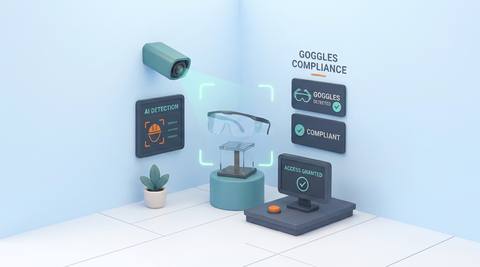
Goggles and safety glasses can be small, transparent or partly hidden. A close, well-lit view helps assess visible presence, while a qualified person confirms the correct protection for the task.
Catalog workflow. Detector availability, scene suitability and event delivery must be verified for the proposed deployment. Camera observations supplement human review and established safety procedures.
Discuss this workflow
 Without IVISIONStandard CCTV feed
 With IVISIONIllustrative event overlay
The Process
Distinguish a visible check from a protection rating Make eye-protection checks useful without overstating what a camera sees.
01Capture the face area without glare obscuring the eyes.
 02
02Test the locally accepted protective eyewear and ordinary glasses.
 03
03Review uncertain eye-region indications before classifying an omission.
 04
04Ask a supervisor to confirm approved protection for the task.
Explore Your Options
| Dimension |  Goggles Compliance Goggles Compliance |  Gloves Compliance Gloves Compliance |
|---|---|---|
| Observation |  Required eye protection is not identifiable around the eyes. Required eye protection is not identifiable around the eyes. | A clearly visible hand appears ungloved. |
| Event criteria | A person is visible at an assessed eye-protection check point. | Hands are visible during a task for which gloves are required. |
| Monitoring setup | Validate accepted goggles or glasses, viewing distance and ambiguity handling. | Validate glove appearance, task boundary and minimum usable image detail. |
| What it cannot establish | Appearance cannot establish lens rating, seal or suitability for welding or chemicals. | An image cannot confirm chemical resistance, sterility or safe glove use near rotating equipment. |
| Practical outcome | Support direct follow-up when eye protection appears absent in a sufficiently detailed view. | Focus glove checks on views where hands and task context are actually observable. |
Illustrative demonstration
Example footage and simulated events explain the review workflow. They do not measure detector performance.
 Sites overview
No matching events.
EXPLORE WHAT’S POSSIBLE
01 / 04 · GOGGLES COMPLIANCE
Workers may start without approved eye protection.
Example event: Clear facial view shows no identifiable eyewear.
Operator response: Lead performs a direct PPE check.
Practical value: Checks before exposure.
Discuss this capability02 / 04 · GOGGLES COMPLIANCE
Ordinary glasses may be mistaken for protection.
Example event: Eyewear type is unclear.
Operator response: Supervisor verifies splash protection.
Practical value: Avoids false assumptions about suitability.
Discuss this capability03 / 04 · GOGGLES COMPLIANCE
Learners need reminders on local rules.
Example event: A student approaches without visible goggles.
Operator response: Instructor confirms equipment.
Practical value: Consistent instruction at entry.
Discuss this capability04 / 04 · GOGGLES COMPLIANCE
Use an approved close frontal or oblique view.
Visibility: Reflections, face shields and head turns can hide eyewear.
Configuration: Validate the accepted eyewear and required detail.
Privacy: Minimize retained face imagery and restrict viewing rights.
Human review: Confirm protection rating, condition and task suitability directly.
Discuss this capabilityFrequently asked questions
Reviews whether required eye protection is visibly present during a defined work-area check.
Not automatically; local protection requirements determine what is acceptable.
Possibly with suitable detail and validated examples; glare can prevent a reliable view.
That is a task-specific safety decision, not a visual inference.
Eye-protection review need not identify the person; verify the chosen implementation.
Find your fit
Support direct follow-up when eye protection appears absent in a sufficiently detailed view. For Workshop supervisors, Process safety coordinators.
Workflow to discuss
Goggles Compliance + Use detailed views for small PPE items.
Discuss a camera view, a monitoring question and the review process your team needs.