Download IVISION Catalog
 01
01Frame the entry
Keep both sides of the intended boundary visible.


An entry event provides a different starting point from continuous occupancy. Validate the monitored boundary and crossing direction, then review the footage and access context before deciding that the entry was unauthorized.
Confirm detector support, camera suitability and the proposed event workflow before deployment.
Discuss area intrusion rules
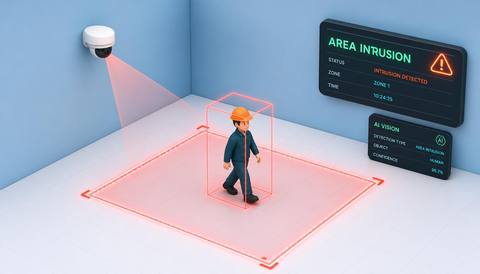
 Without IVISIONStandard CCTV feed
 With IVISIONIllustrative event overlay
The Process
Connect a boundary crossing with its visible context Help security teams review where and when a boundary was crossed.
01Keep both sides of the intended boundary visible.
 02
02Test normal paths, reversals and overlapping people.
 03
03Inspect camera and time context in supported event records.
 04
04Security verifies authorization and follows its response procedure.
Explore Your Options
| Dimension |  Area Intrusion Area Intrusion |  Virtual fence monitoring Virtual fence monitoring |
|---|---|---|
| Observation |  A supported object moving across a defined entry boundary. A supported object moving across a defined entry boundary. | A supported object crossing an image-defined line or perimeter. |
| Event criteria | The validated direction or entry condition is met. | A validated crossing condition is met at the selected boundary. |
| Monitoring setup | Confirm object classes, boundary position and relevant operating periods. | Confirm line geometry, direction and relevant object classes. |
| What it cannot establish | A crossing does not prove criminal intent or establish access permission. | An image line is not a surveyed physical fence or guaranteed perimeter protection. |
| Practical outcome | Help security teams review where and when a boundary was crossed. | Focus monitoring on a chosen visible boundary without changing the physical site layout. |
Illustrative demonstration
Example footage and simulated events explain the review workflow. They do not measure detector performance.
 Sites overview
No matching events.
EXPLORE WHAT’S POSSIBLE
01 / 04 · AREA INTRUSION
Unexpected entry needs a clear review point.
Example event: A supported crossing occurs into the yard.
Operator response: Compare the event with scheduled access.
Practical value: Focus footage review on the entry moment.
Discuss this capability02 / 04 · AREA INTRUSION
A boundary is separate from the public path.
Example event: A person crosses into the monitored courtyard.
Operator response: Verify the access purpose before responding.
Practical value: Clarify which side of the boundary was entered.
Discuss this capability03 / 04 · AREA INTRUSION
Temporary access routes need contextual review.
Example event: A candidate inward crossing is recorded.
Operator response: Check the site’s work and visitor arrangements.
Practical value: Support review of changing access conditions.
Discuss this capability04 / 04 · AREA INTRUSION
Align the view so crossing direction is distinguishable.
Visibility: Crowds, shadows and oblique angles can confuse entry interpretation.
Configuration: Validate tracking and crossing support as an end-to-end rule.
Privacy: Keep public-space capture proportionate to the boundary purpose.
Human review: Establish authorization through the appropriate access records.
Discuss this capabilityFrequently asked questions
Identify a candidate crossing into a monitored area under a validated entry rule.
No. The event is a candidate entry until access context is checked.
Only where direction rules and camera geometry have been validated.
Test boundary-edge behavior; repeated or ambiguous events may occur.
Event delivery channels must be separately configured and verified.
Find your fit
Help security teams review where and when a boundary was crossed. For Security control rooms, Site managers.
Workflow to discuss
Area Intrusion + Locate candidate entry moments.
Discuss a camera view, a monitoring question and the review process your team needs.