Download IVISION Catalog
 01
01Define the counted space
Document the physical area and camera coverage.


A supported counting workflow can provide a current indication of people visible in an area. Validate the count against the actual scene and keep it separate from certified capacity, emergency accountability or a complete record of everyone on site.
Confirm detector support, camera suitability and the proposed event workflow before deployment.
Discuss occupancy measurement
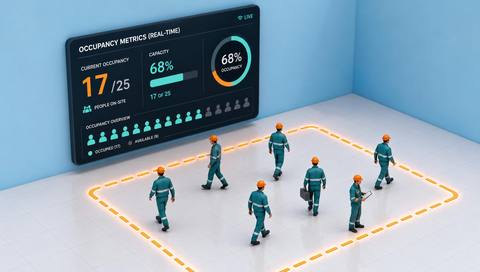
 Without IVISIONStandard CCTV feed
 With IVISIONIllustrative event overlay
The Process
Use camera counts with their coverage limits Help operators understand observed activity levels in a monitored area.
01Document the physical area and camera coverage.
 02
02Compare supported counts with manual checks under representative conditions.
 03
03Present the observation time and known coverage limits.
 04
04Staff interpret the estimate alongside service and capacity procedures.
Explore Your Options
| Dimension |  Occupancy Metrics (Real-Time) Occupancy Metrics (Real-Time) |  Zone occupancy views Zone occupancy views |
|---|---|---|
| Observation |  People visible within a defined camera area. People visible within a defined camera area. | Supported presence or count observations associated with named zones. |
| Event criteria | A supported counter produces an updated estimate for that area. | The available interface presents an updated state for each configured zone. |
| Monitoring setup | Verify counting method, update behavior and treatment of overlapping views. | Verify zone definitions, refresh timing and unknown-state behavior. |
| What it cannot establish | Visible occupancy is an estimate and may exclude people behind obstructions or outside coverage. | A displayed zone state is not proof of complete coverage, permission or safe capacity. |
| Practical outcome | Help operators understand observed activity levels in a monitored area. | Help operators locate which monitored areas appear occupied. |
Illustrative demonstration
Example footage and simulated events explain the review workflow. They do not measure detector performance.
 Sites overview
No matching events.
EXPLORE WHAT’S POSSIBLE
01 / 04 · OCCUPANCY METRICS (REAL-TIME)
Teams need context for changing demand.
Example event: The supported workflow reports a visible occupancy estimate.
Operator response: Check the scene and adjust service within normal procedures.
Practical value: Inform a staffing discussion.
Discuss this capability02 / 04 · OCCUPANCY METRICS (REAL-TIME)
Use changes throughout the day.
Example event: Current visible occupancy is estimated.
Operator response: Review the count against coverage and booking context.
Practical value: Support day-to-day space awareness.
Discuss this capability03 / 04 · OCCUPANCY METRICS (REAL-TIME)
Crowding varies with arrivals.
Example event: An updated visible count becomes available.
Operator response: Use it with trained observation and station procedures.
Practical value: Add a bounded activity indicator.
Discuss this capability04 / 04 · OCCUPANCY METRICS (REAL-TIME)
Favor views that separate people and cover the intended area.
Visibility: Dense groups and occlusion reduce counting reliability.
Configuration: Verify counting support, refresh timing and duplicate handling.
Privacy: Prefer aggregate review and avoid unnecessary personal identification.
Human review: Check counts before decisions with safety or capacity consequences.
Discuss this capabilityFrequently asked questions
Present a current estimate of visible occupancy from a supported counting workflow.
No. Treat it as an estimate unless a specific measured accuracy has been established for the deployment.
Not from one camera view; complete coverage and reliable entry-exit accounting are separate requirements.
No. Capacity and emergency procedures need appropriate independent controls.
They may be unless a separately validated aggregation method prevents duplicates.
Find your fit
Help operators understand observed activity levels in a monitored area. For Building operations teams, Service-area managers.
Workflow to discuss
Occupancy Metrics (Real-Time) + Provide a current indication of visible activity.
Discuss a camera view, a monitoring question and the review process your team needs.