
 Download IVISION Catalog
 01
01Map the traffic boundary
Confirm the actual vehicle-only area with the site safety team.


A pedestrian visible in a vehicle-only zone can warrant a prompt check. Validate the camera rule against the actual traffic plan and use the observation alongside physical separation, signage and trained traffic management.
Confirm detector support, camera suitability and the proposed event workflow before deployment.
Discuss pedestrian-zone coverage
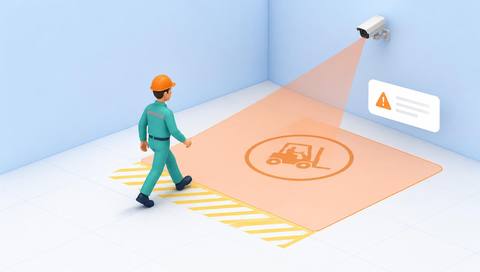
 Without IVISIONStandard CCTV feed
 With IVISIONIllustrative event overlay
The Process
Support the site’s traffic-separation procedure Help site teams review pedestrian and vehicle separation concerns.
01Confirm the actual vehicle-only area with the site safety team.
 02
02Validate people beside vehicles, loads and marked crossings.
 03
03Inspect whether the person is inside the intended area.
 04
04The responsible team follows the established separation and response plan.
Explore Your Options
| Dimension |  Pedestrian entry, vehicle-only areas Pedestrian entry, vehicle-only areas |  Restricted Zone Monitoring Restricted Zone Monitoring |
|---|---|---|
| Observation |  A supported person observation inside or crossing into a vehicle-only zone. A supported person observation inside or crossing into a vehicle-only zone. | Supported people or objects within a defined image area. |
| Event criteria | The validated pedestrian presence or entry criterion is met. | A validated presence condition occurs inside the selected zone. |
| Monitoring setup | Confirm the traffic plan, pedestrian exceptions and monitored boundary. | Confirm zone geometry, relevant classes and operating context. |
| What it cannot establish | A camera observation does not establish collision risk, stopping distance or safe vehicle control. | Presence does not establish identity, access permission or malicious intent. |
| Practical outcome | Help site teams review pedestrian and vehicle separation concerns. | Help operators check activity where access requires extra scrutiny. |
Illustrative demonstration
Example footage and simulated events explain the review workflow. They do not measure detector performance.
 Sites overview
No matching events.
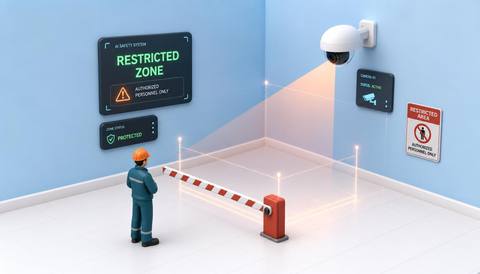 Area Monitoring
Review general presence in a controlled area.
Read More
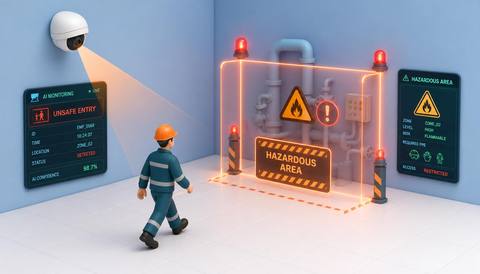 Area Monitoring
Place the observation within a broader hazard-entry procedure.
Read More Area Monitoring
Review approaches near the vehicle-only boundary.
Read MoreEXPLORE WHAT’S POSSIBLE
01 / 04 · PEDESTRIAN ENTRY, VEHICLE-ONLY AREAS
Pedestrian routes run near vehicle movement.
Example event: A person appears within the designated vehicle lane.
Operator response: Use the site’s approved traffic response.
Practical value: Provide a specific location for review.
Discuss this capability02 / 04 · PEDESTRIAN ENTRY, VEHICLE-ONLY AREAS
Staff access can cross vehicle-only space.
Example event: A candidate pedestrian entry occurs.
Operator response: Verify the work context and traffic arrangements.
Practical value: Support adherence to the site traffic plan.
Discuss this capability03 / 04 · PEDESTRIAN ENTRY, VEHICLE-ONLY AREAS
Temporary site layouts alter separation needs.
Example event: A person is visible inside the plant route zone.
Operator response: The site team follows its pedestrian-control procedure.
Practical value: Help review the current route arrangement.
Discuss this capability04 / 04 · PEDESTRIAN ENTRY, VEHICLE-ONLY AREAS
Show pedestrian routes and vehicle-zone edges clearly.
Visibility: Large vehicles can completely hide people.
Configuration: Validate person detection and zone logic; no collision-avoidance control is implied.
Privacy: Use observations for the legitimate site-safety purpose.
Human review: Qualified staff assess the actual traffic situation.
Discuss this capabilityFrequently asked questions
Identify candidate pedestrian presence or entry within a designated vehicle-only image area.
No. It supplements observation and does not replace physical traffic controls.
Not when the person is fully occluded.
Automatic vehicle control is not part of this established workflow.
Review the event against approved crossings and work procedures.
Find your fit
Help site teams review pedestrian and vehicle separation concerns. For Yard safety teams, Warehouse supervisors.
Workflow to discuss
Pedestrian entry, vehicle-only areas + Highlight a specific traffic-separation concern.
Discuss a camera view, a monitoring question and the review process your team needs.





