Download IVISION Catalog
 01
01Define meaningful zones
Use physical areas that operators can locate on site.


A zone view can distinguish an occupied waiting area from an empty adjacent space. Verify the underlying observations and the available presentation so operators understand which areas are visible and which remain unknown.
Confirm detector support, camera suitability and the proposed event workflow before deployment.
Review zone occupancy views
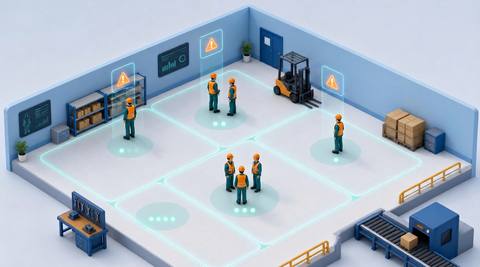
 Without IVISIONStandard CCTV feed
 With IVISIONIllustrative event overlay
The Process
Locate activity instead of relying on one total Help operators locate which monitored areas appear occupied.
01Use physical areas that operators can locate on site.
 02
02Check presence or counting support in each zone.
 03
03Confirm that displayed states and timestamps match the underlying observations.
 04
04Use the location context for a practical operational check.
Explore Your Options
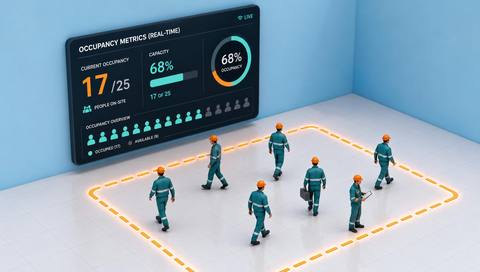
| Dimension |  Zone occupancy views Zone occupancy views |  Occupancy Metrics (Real-Time) Occupancy Metrics (Real-Time) |
|---|---|---|
| Observation |  Supported presence or count observations associated with named zones. Supported presence or count observations associated with named zones. | People visible within a defined camera area. |
| Event criteria | The available interface presents an updated state for each configured zone. | A supported counter produces an updated estimate for that area. |
| Monitoring setup | Verify zone definitions, refresh timing and unknown-state behavior. | Verify counting method, update behavior and treatment of overlapping views. |
| What it cannot establish | A displayed zone state is not proof of complete coverage, permission or safe capacity. | Visible occupancy is an estimate and may exclude people behind obstructions or outside coverage. |
| Practical outcome | Help operators locate which monitored areas appear occupied. | Help operators understand observed activity levels in a monitored area. |
Illustrative demonstration
Example footage and simulated events explain the review workflow. They do not measure detector performance.
 Sites overview
No matching events.
EXPLORE WHAT’S POSSIBLE
01 / 04 · ZONE OCCUPANCY VIEWS
A single total hides which spaces are in use.
Example event: Supported observations show occupancy by zone.
Operator response: Review coverage before using the view for space decisions.
Practical value: Make activity easier to locate.
Discuss this capability02 / 04 · ZONE OCCUPANCY VIEWS
Teams need to know where visible activity is concentrated.
Example event: One staging zone is shown as occupied.
Operator response: Check the associated camera and work plan.
Practical value: Provide location context for coordination.
Discuss this capability03 / 04 · ZONE OCCUPANCY VIEWS
Different areas need different operational attention.
Example event: A zone state indicates visible presence.
Operator response: Verify the view and assign the appropriate service check.
Practical value: Support area-specific follow-up.
Discuss this capability04 / 04 · ZONE OCCUPANCY VIEWS
Align each zone with a clear physical area in the camera view.
Visibility: Overlapping zones and hidden corners can confuse interpretation.
Configuration: Confirm the actual zone-view interface and state update behavior.
Privacy: Use aggregate states where they meet the operational need.
Human review: Check the camera image before treating a displayed state as definitive.
Discuss this capabilityFrequently asked questions
Present visible occupancy by defined camera zone where the underlying observations are supported.
A map interface must be verified separately; the catalog workflow does not establish one.
No. A person may be hidden, missed or outside the observed portion.
If supported, overlap must be documented to avoid misleading totals.
Reservation integration is separate and is not established by occupancy presentation.
Find your fit
Help operators locate which monitored areas appear occupied. For Facilities operators, Space-planning teams.
Workflow to discuss
Zone occupancy views + Attach occupancy information to named spaces.
Discuss a camera view, a monitoring question and the review process your team needs.