
 Download IVISION Catalog
 01
01Prepare the view
Define the incident window and permitted sources.


Specify start, end and time zone before selecting observations. Validate clock alignment and incomplete tracks at the boundaries so the resulting sequence does not imply activity outside the authorized review period.
Catalog workflow. Confirm detector availability, permitted use and event delivery for the proposed deployment. Website examples are illustrative.
Assess interval-based review
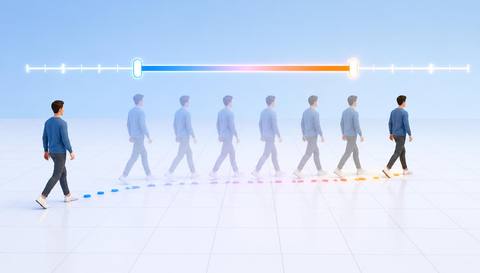
 Without IVISIONStandard CCTV feed
 With IVISIONIllustrative event overlay
The Process
Time boundaries are part of the evidence Keep movement review relevant and proportionate.
01Define the incident window and permitted sources.
 02
02Validate clock alignment and time-filter behavior.
 03
03Review partial tracks and source records at the boundaries.
 04
04Expand the interval only when justified by the review purpose.
Explore Your Options
| Dimension |  Tracking across selected intervals Tracking across selected intervals |  Historical route visualization Historical route visualization |
|---|---|---|
| Observation |  Track observations within a selected temporal window. Track observations within a selected temporal window. | Retained positions or sightings from a past interval. |
| Event criteria | A supported query retrieves eligible records for that interval. | Supported records are selected and ordered for route review. |
| Monitoring setup | Confirm time zone, inclusive boundaries and track clipping. | Confirm time range, retention, source and association method. |
| What it cannot establish | Cannot establish movement before or after the selected evidence. | Cannot recover missing footage or prove movement between observations. |
| Practical outcome | Help investigators focus on the relevant period and avoid unrelated history. | Help teams examine a recorded route with its evidence limits. |
Illustrative demonstration
Example footage and simulated events explain the review workflow. They do not measure detector performance.
 Sites overview
No matching events.
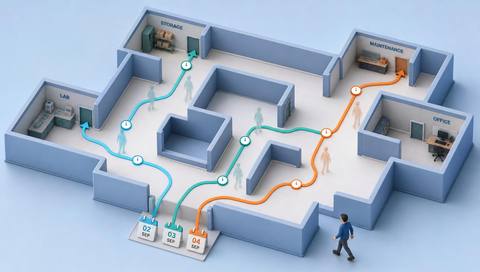 Tracking & Movement
Display the selected past observations.
Read More
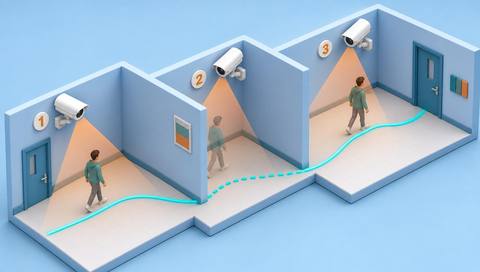 Tracking & Movement
Check time alignment across sources.
Read More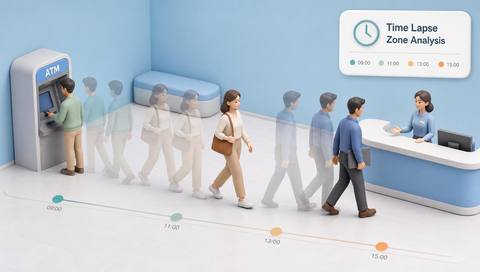 Tracking & Movement
Compare aggregate activity over a broader defined period.
Read MoreEXPLORE WHAT’S POSSIBLE
01 / 04 · TRACKING ACROSS SELECTED INTERVALS
The shift crosses midnight.
Example event: Relevant records fall on two dates.
Operator response: Check time zone and window boundaries.
Practical value: Avoids missing the event.
Discuss this capability02 / 04 · TRACKING ACROSS SELECTED INTERVALS
A short loading event is under investigation.
Example event: Only the relevant interval is selected.
Operator response: Inspect associated vehicle observations.
Practical value: Reduces unrelated review.
Discuss this capability03 / 04 · TRACKING ACROSS SELECTED INTERVALS
A track starts before the permitted period.
Example event: The visible sequence begins mid-route.
Operator response: State that the beginning is unavailable.
Practical value: Preserves scope limits.
Discuss this capability04 / 04 · TRACKING ACROSS SELECTED INTERVALS
Use source cameras with aligned clocks.
Visibility: Missing recordings create temporal gaps.
Configuration: Verify timestamp filters and retention.
Privacy: Keep searches within an authorized purpose and period.
Human review: Check time zone and incomplete endpoints.
Discuss this capabilityFrequently asked questions
Restricts movement review to observations within an explicitly chosen time range.
Different clock conventions can select the wrong period.
Yes. The selected segment may be incomplete.
No. Only retained observations can be reviewed.
No. Start with the justified relevant interval.
Find your fit
Help investigators focus on the relevant period and avoid unrelated history. For Incident investigators, Operations reviewers.
Workflow to discuss
Tracking across selected intervals + Limit unrelated history.
Discuss a camera view, a monitoring question and the review process your team needs.





