
 Download IVISION Catalog
 01
01Define the mapped area
Select useful coverage and exclude regions that cannot be observed consistently.


A density map divides a suitable view into areas and represents their estimated concentration. It can help explain why an entrance total looks ordinary while one local area is crowded. Interpreting the colors requires a defined time window, perspective treatment and a clear distinction between relative intensity and a calibrated physical density.
Confirm the supported density output and mapping pipeline; website heatmaps are illustrative.
Assess a crowd mapping view
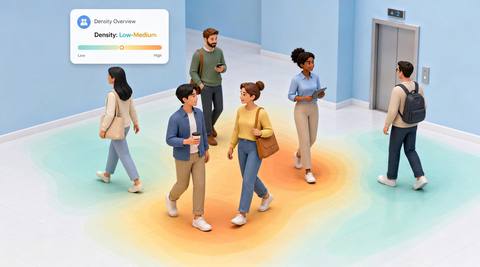
 Without IVISIONStandard CCTV feed
 With IVISIONIllustrative event overlay
The Process
Spatial context for crowd review. Direct attention to the part of a scene that needs human assessment.
01Select useful coverage and exclude regions that cannot be observed consistently.
 02
02Confirm the supported density output, perspective handling and meaning of each legend value.
 03
03Review maps for comparable intervals and inspect the source view where a concentration appears.
 04
04Use trained staff to assess circulation and decide whether signage, queue layout or assistance is appropriate.
Explore Your Options
| Dimension |  Crowd Density Map Crowd Density Map |  Crowd-density mapping & analysis Crowd-density mapping & analysis |
|---|---|---|
| Observation |  Estimated crowd concentration by image region or calibrated ground area. Estimated crowd concentration by image region or calibrated ground area. | Estimated concentration of people in spatial regions. |
| Event criteria | A supported density output is aggregated over the defined view and reporting interval. | A supported density method identifies a region meeting a validated criterion. |
| Monitoring setup | Agree region boundaries, time aggregation, color legend and whether values are relative or physically calibrated. | Confirm map area, calibration, aggregation and thresholds. |
| What it cannot establish | Map color does not establish a legal capacity limit, individual identity or the cause of crowding. Perspective and occlusion affect interpretation. | Cannot certify safe crowd pressure or visibility of every person. |
| Practical outcome | Helps reviewers locate concentration within a view rather than relying only on a total count. | Help operators locate uneven crowd distribution. |
Illustrative demonstration
Example footage and simulated events explain the review workflow. They do not measure detector performance.
 Sites overview
No matching events.
People CountingExplains the underlying crowd concentration measurement.
Read More
 People Counting
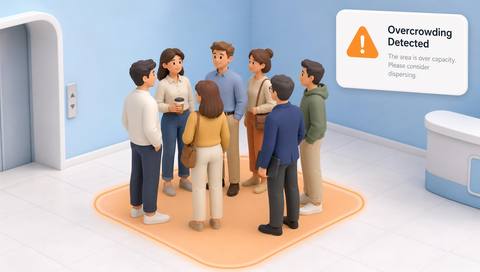
A threshold-based review is a separate step from drawing the map.
Read More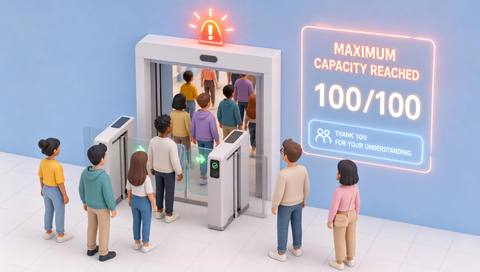 People Counting
Capacity rules require their own authorized limit and validated count.
Read MoreEXPLORE WHAT’S POSSIBLE
01 / 04 · CROWD DENSITY MAP
Passengers cluster beside one gate although the overall hall remains open.
Example event: The mapped region shows higher estimated concentration than adjacent areas.
Operator response: An operator checks the camera and asks staff to assess circulation.
Practical value: Review focuses on the local accumulation.
Discuss this capability02 / 04 · CROWD DENSITY MAP
A service queue spreads into a circulation route.
Example event: The relevant region shows repeated concentration during the interval.
Operator response: Venue staff inspect the queue boundary and adjust the operational plan.
Practical value: The map connects location with a specific review question.
Discuss this capability03 / 04 · CROWD DENSITY MAP
Managers need to compare two queue arrangements.
Example event: Comparable intervals show different spatial concentration patterns.
Operator response: Review the maps alongside staffing, operating hours and direct observations.
Practical value: Layout discussions use scene-specific evidence.
Discuss this capability04 / 04 · CROWD DENSITY MAP
Prefer a view with useful coverage of the circulation area and manageable perspective distortion.
Visibility: Occluded and distant regions may not support comparable estimates.
Configuration: Verify density-model availability, map generation and any ground-plane calibration before specifying physical units.
Privacy: Use aggregate views where suitable and avoid unnecessary identification of individuals.
Human review: Crowd-control decisions require trained personnel and applicable site procedures.
Discuss this capabilityFrequently asked questions
Presents spatial estimates of observed crowd concentration across a defined camera area.
No. It means the configured legend represents a higher value. Safety depends on conditions, measurement validity and the response procedure.
Only a validated, physically calibrated workflow could support that unit. A relative image heatmap is different.
Not without checking coverage, perspective, scale and measurement definitions.
A reviewer needs context for queues, obstructions and ordinary activity behind the aggregate.
Find your fit
Helps reviewers locate concentration within a view rather than relying only on a total count. For Venue operators, Transport operations teams, Public-space managers.
Workflow to discuss
Crowd Density Map + Shows local concentration that a whole-scene total can hide.
Discuss a camera view, a monitoring question and the review process your team needs.





