Download IVISION Catalog
 01
01Prepare the view
Define the aggregate planning question and regions.


Confirm how staff are distinguished and whether the map represents presence, movement or dwell. Use aggregated regions and comparable periods, and check coverage before interpreting quiet areas as unused or workers as absent.
Catalog workflow. Confirm detector availability, permitted use and event delivery for the proposed deployment. Website examples are illustrative.
Assess workforce heatmaps

 Without IVISIONStandard CCTV feed
 With IVISIONIllustrative event overlay
The Process
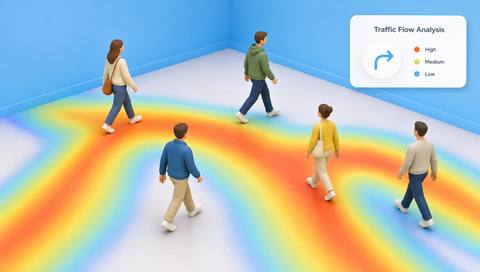
A heatmap describes observation density, not output Support space planning with qualified workforce patterns.
01Define the aggregate planning question and regions.
 02
02Validate staff association and metric selection.
 03
03Review the map with coverage and schedule context.
 04
04Discuss findings with space users before changing provision.
Explore Your Options
| Dimension |  Employee-presence and workforce heatmaps Employee-presence and workforce heatmaps |  Employee occupancy tracking Employee occupancy tracking |
|---|---|---|
| Observation |  Aggregated staff-associated observations across defined regions. Aggregated staff-associated observations across defined regions. | Observations associated with employees in a defined area. |
| Event criteria | Supported aggregation applies the selected presence or movement metric. | A supported method updates the staff-presence estimate. |
| Monitoring setup | Confirm staff definition, metric, region scale and period. | Confirm employee source, areas, time periods and exclusions. |
| What it cannot establish | Cannot establish productivity, preferences or complete attendance. | Cannot establish hours worked, productivity or complete whereabouts. |
| Practical outcome | Help workplace planners understand workforce distribution without individual ranking. | Help teams understand where workforce presence is concentrated. |
Illustrative demonstration
Example footage and simulated events explain the review workflow. They do not measure detector performance.
 Sites overview
No matching events.
EXPLORE WHAT’S POSSIBLE
01 / 04 · EMPLOYEE-PRESENCE AND WORKFORCE HEATMAPS
Teams use collaboration rooms outside the view.
Example event: Desk-area intensity is low.
Operator response: Check alternative workspaces.
Practical value: Avoids absence assumptions.
Discuss this capability02 / 04 · EMPLOYEE-PRESENCE AND WORKFORCE HEATMAPS
Team rotations change distribution.
Example event: Heat patterns move between stations.
Operator response: Compare the rotation schedule.
Practical value: Explains workforce flow.
Discuss this capability03 / 04 · EMPLOYEE-PRESENCE AND WORKFORCE HEATMAPS
Visitors mix with staff.
Example event: Map intensity reflects an incorrect population.
Operator response: Validate staff classification.
Practical value: Improves planning evidence.
Discuss this capability04 / 04 · EMPLOYEE-PRESENCE AND WORKFORCE HEATMAPS
Use consistently covered workplace regions.
Visibility: Partitions create apparent low-use areas.
Configuration: Verify staff association and aggregation; no heatmap engine was established.
Privacy: Avoid named trails and small groups that expose individuals unnecessarily.
Human review: Do not interpret intensity as performance.
Discuss this capabilityFrequently asked questions
Aggregates validated employee-presence observations into a spatial summary for an approved period.
No. It indicates the selected observation measure.
No. Aggregate planning should minimize identity detail.
Yes. Validate the population classification.
Only with compatible periods, metrics and coverage.
Find your fit
Help workplace planners understand workforce distribution without individual ranking. For Workplace planners, Facilities analysts.
Workflow to discuss
Employee-presence and workforce heatmaps + Prefer aggregate workforce patterns.
Discuss a camera view, a monitoring question and the review process your team needs.