
 Download IVISION Catalog
 01
01Choose the observational unit
Decide whether the question concerns passages, presence samples or residence duration.


A people heatmap summarizes observations across an area. Its meaning depends on whether the source counts passages, sampled presence or time spent there. Define that unit before comparing colors or changing a layout. The pattern does not reveal what visitors intended, whether they purchased anything or how productive employees were.
Verify aggregation and export support. Website map intensity is illustrative and does not establish production analytics.
Scope an activity heatmap
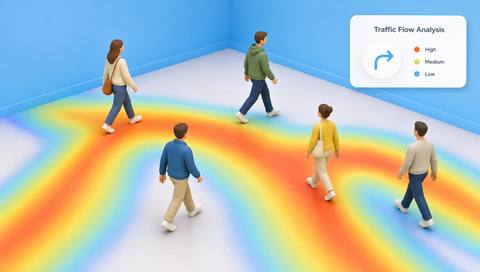
 Without IVISIONStandard CCTV feed
 With IVISIONIllustrative event overlay
The Process
A time window gives a heatmap its meaning. Ground space-planning discussions in a defined observational measure.
01Decide whether the question concerns passages, presence samples or residence duration.
 02
02Record the view, schedule and camera availability for each comparison period.
 03
03Review the supported spatial output alongside source observations and the legend.
 04
04Compare like-for-like periods and use direct operational evidence before drawing a causal conclusion.
Explore Your Options
| Dimension |  People Activity Heatmap People Activity Heatmap |  Heatmap & Traffic Flow Analysis Heatmap & Traffic Flow Analysis |
|---|---|---|
| Observation |  Accumulated people observations associated with areas during a reporting period. Accumulated people observations associated with areas during a reporting period. | Aggregated tracks or occupancy across visible regions. |
| Event criteria | A supported aggregation process combines the selected observation unit over the specified interval. | A supported method accumulates a specified movement metric. |
| Monitoring setup | Choose the unit, time window, region boundaries, normalization and treatment of unavailable camera periods. | Confirm metric, period, normalization and camera alignment. |
| What it cannot establish | A hot area may reflect repeated passages or long presence depending on the unit. Heat does not prove preference, intent, a sale or productivity. | Cannot explain motives or represent unseen areas. |
| Practical outcome | Supports layout review with a clear record of where observations accumulate over time. | Help planners compare busy routes and underused areas. |
Illustrative demonstration
Example footage and simulated events explain the review workflow. They do not measure detector performance.
 Sites overview
No matching events.
People CountingConnects accumulated activity with directional movement analysis.
Read More
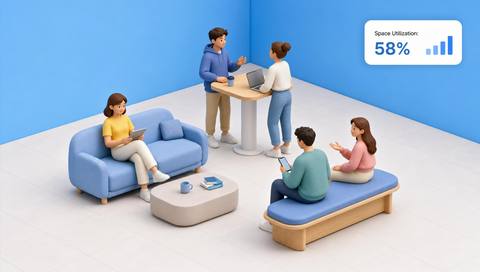 People Counting
Space-use interpretation needs its own definition and coverage checks.
Read More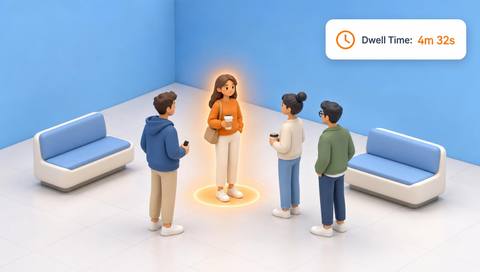 People Counting
Residence duration is one possible input and differs from passage frequency.
Read MoreEXPLORE WHAT’S POSSIBLE
01 / 04 · PEOPLE ACTIVITY HEATMAP
A display may affect circulation through an adjacent aisle.
Example event: The chosen passage measure accumulates differently across comparable periods.
Operator response: Review the map with store hours, display changes and direct observations.
Practical value: Layout decisions use a defined movement measure.
Discuss this capability02 / 04 · PEOPLE ACTIVITY HEATMAP
A planner wants to assess patterns of observed space use.
Example event: Presence samples accumulate in some areas more than others.
Operator response: Check coverage and occupancy policy without scoring individual employees.
Practical value: The discussion stays focused on shared space.
Discuss this capability03 / 04 · PEOPLE ACTIVITY HEATMAP
An offline camera period creates an apparent reduction in activity.
Example event: The aggregate has fewer source observations for that period.
Operator response: Exclude or qualify the incomplete interval before comparison.
Practical value: Missing data is distinguished from a real demand change.
Discuss this capability04 / 04 · PEOPLE ACTIVITY HEATMAP
Use stable views of the areas being compared; document view changes.
Visibility: Obstructions and camera outages alter the observation sample.
Configuration: Confirm aggregation support and whether output represents counts, samples or duration; do not mix units.
Privacy: Prefer aggregate spatial results and avoid using them as a proxy for an individual's performance or interests.
Human review: A planner should assess confounding changes such as staffing, opening hours and camera coverage.
Discuss this capabilityFrequently asked questions
Aggregates observed people activity by area over a specified time window to show relative spatial intensity.
A higher value of the selected measure within that map's legend, not necessarily more unique people.
A heatmap typically aggregates activity over time; a density map concerns spatial concentration within its defined interval.
No. Observed presence or movement does not establish preference or a purchase.
Only after reviewing the changed coverage and measure. Otherwise the apparent change may be caused by the new view.
Find your fit
Supports layout review with a clear record of where observations accumulate over time. For Facility planners, Retail operations teams, Workplace managers.
Workflow to discuss
People Activity Heatmap + Makes the unit behind map intensity explicit.
Discuss a camera view, a monitoring question and the review process your team needs.





