Download IVISION Catalog
 01
01Prepare the view
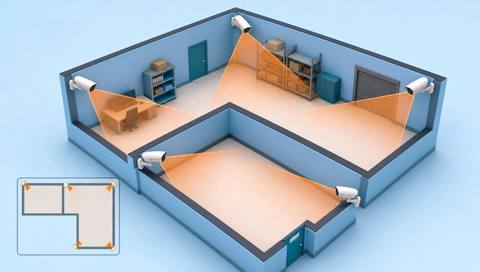
Draw the boundary against the current camera view.


The portal supports drawn zones, schedules, severity and feature selections. Confirm that the external processing service consumes the intended configuration, and test representative events before relying on downstream alerts.
Catalog workflow. Confirm detector availability, permitted use and event delivery for the proposed deployment. Website examples are illustrative.
Review zone-rule configuration
 Without IVISIONStandard CCTV feed
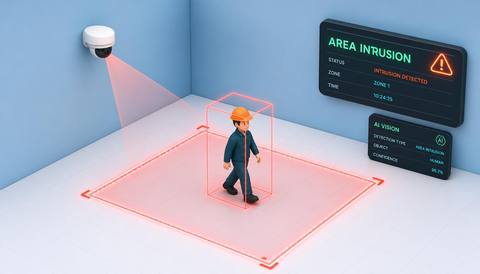
 With IVISIONIllustrative event overlay
The Process
Saved criteria still need validated execution Keep configuration and observed results aligned.
01Draw the boundary against the current camera view.
 02
02Set the relevant schedule and supported observations.
 03
03Test the external provider against representative events.
 04
04Review results and adjust through the authorized configuration process.
Explore Your Options
| Dimension |  Custom rules for each area, camera or time period Custom rules for each area, camera or time period |  Intelligent area and zone monitoring Intelligent area and zone monitoring |
|---|---|---|
| Observation |  A saved zone and its selected monitoring conditions. A saved zone and its selected monitoring conditions. | The selected supported event within a camera-relative boundary. |
| Event criteria | An authorized user configures geometry, active time and relevant criteria. | Validated analysis meets the agreed area criterion. |
| Monitoring setup | Validate shape, aspect ratio, schedule and feature support. | Confirm geometry, schedule, event types and exceptions. |
| What it cannot establish | Saving a rule does not prove detection or notification execution. | Cannot observe hidden conditions or determine every activity within a boundary. |
| Practical outcome | Help administrators align configuration with the physical site. | Make area monitoring purposeful rather than a generic watch-everything claim. |
Illustrative demonstration
Example footage and simulated events explain the review workflow. They do not measure detector performance.
 Sites overview
No matching events.
EXPLORE WHAT’S POSSIBLE
01 / 04 · CUSTOM RULES FOR EACH AREA, CAMERA OR TIME PERIOD
The monitored area changes with operations.
Example event: A new boundary is saved.
Operator response: Test events on both sides.
Practical value: Checks geometric alignment.
Discuss this capability02 / 04 · CUSTOM RULES FOR EACH AREA, CAMERA OR TIME PERIOD
Rules differ outside opening hours.
Example event: A custom schedule is configured.
Operator response: Verify local time and execution.
Practical value: Keeps timing consistent.
Discuss this capability03 / 04 · CUSTOM RULES FOR EACH AREA, CAMERA OR TIME PERIOD
Aspect ratio changes shift old geometry.
Example event: The zone no longer matches the machine approach.
Operator response: Redraw and revalidate.
Practical value: Prevents misplaced monitoring.
Discuss this capability04 / 04 · CUSTOM RULES FOR EACH AREA, CAMERA OR TIME PERIOD
Draw against the current source aspect ratio.
Visibility: Camera movement invalidates alignment.
Configuration: Zone authoring is implemented; external execution and delivery need confirmation.
Privacy: Limit zones and access to the approved purpose.
Human review: Verify geometry and event results after changes.
Discuss this capabilityFrequently asked questions
Stores camera-relative zone geometry, schedules and selected event criteria for an area-specific monitoring workflow.
Yes. The portal model includes rectangle, polygon and freehand geometry.
Yes. Always, business-hours, night-shift and custom schedule fields exist.
Not by itself; processing and delivery must be verified.
Revalidate the zone against the new view.
Find your fit
Help administrators align configuration with the physical site. For Camera administrators, Facility safety leads.
Workflow to discuss
Custom rules for each area, camera or time period + Use site-specific boundaries.
Discuss a camera view, a monitoring question and the review process your team needs.