
 Download IVISION Catalog
 01
01Prepare the view
Approve the known-profile population.


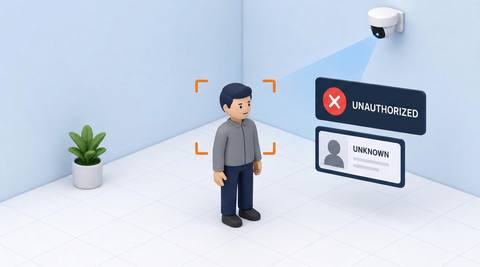
Define the reference population and acceptance criteria before interpreting a known or unknown label. An unresolved observation may reflect missing enrollment or poor visibility, so the next step should be verification or assistance.
Catalog workflow. Confirm detector availability, permitted use and event delivery for the proposed deployment. Website examples are illustrative.
Define known-profile classification

 Without IVISIONStandard CCTV feed
 With IVISIONIllustrative event overlay
The Process
Unknown is a matching state Route matching exceptions consistently.
01Approve the known-profile population.
 02
02Validate matching and ambiguous-result handling.
 03
03Review the classification with image quality and source context.
 04
04Use a credential or visitor process to resolve uncertainty.
Explore Your Options
| Dimension |  Known-person and unknown-person classification Known-person and unknown-person classification |  Stranger / Unknown Person Alert Stranger / Unknown Person Alert |
|---|---|---|
| Observation |  A face observation with or without an accepted profile association. A face observation with or without an accepted profile association. | An observation without a confirmed known profile. |
| Event criteria | A supported matcher applies validated acceptance criteria. | The available matcher returns no acceptable association. |
| Monitoring setup | Confirm profile population, threshold and ambiguous-match handling. | Confirm known population, threshold and duplicate policy. |
| What it cannot establish | Cannot establish legitimacy, threat or whether someone has visited previously. | Cannot prove danger or that someone has never visited. |
| Practical outcome | Make matching state explicit without judging the person. | Resolve unfamiliar arrivals through a defined reception process. |
Illustrative demonstration
Example footage and simulated events explain the review workflow. They do not measure detector performance.
 Sites overview
No matching events.
Face RecognitionDefine the response to unresolved observations.
Read More
 Face Recognition
Check eligibility separately from matching state.
Read MoreFace RecognitionReview the additional governance needed for repeated-sighting links.
Read MoreEXPLORE WHAT’S POSSIBLE
01 / 04 · KNOWN-PERSON AND UNKNOWN-PERSON CLASSIFICATION
New staff are not enrolled yet.
Example event: An observation is classified unknown.
Operator response: Check onboarding and credentials.
Practical value: Finds enrollment gaps.
Discuss this capability02 / 04 · KNOWN-PERSON AND UNKNOWN-PERSON CLASSIFICATION
Protective equipment obscures detail.
Example event: A known worker remains unresolved.
Operator response: Use the approved alternative check.
Practical value: Avoids false exclusion.
Discuss this capability03 / 04 · KNOWN-PERSON AND UNKNOWN-PERSON CLASSIFICATION
Guests are outside the staff population.
Example event: A guest is classified unknown.
Operator response: Complete normal registration.
Practical value: Keeps classification contextual.
Discuss this capability04 / 04 · KNOWN-PERSON AND UNKNOWN-PERSON CLASSIFICATION
Use a suitable face view.
Visibility: Blur and coverings reduce associations.
Configuration: Confirm matcher and classification thresholds.
Privacy: Minimize retained unassociated imagery.
Human review: Verify the person through the approved process.
Discuss this capabilityFrequently asked questions
Classifies an observation as associated or unassociated with a defined known-profile set.
No. Recognition and permission are different.
No. It only indicates no accepted association.
Potential ambiguity must be handled and reviewed.
Apply the justified retention policy and relevant requirements.
Find your fit
Make matching state explicit without judging the person. For Reception operators, Identity workflow owners.
Workflow to discuss
Known-person and unknown-person classification + Define the reference population.
Discuss a camera view, a monitoring question and the review process your team needs.





