
 Download IVISION Catalog
 01
01Prepare the view
Define the visitor-facing area and decide whether movement, dwell or visit frequency answers the question.


A reception, exhibition or shop floor can attract very different patterns during the day. Where suitable tracking and aggregation are available, a heatmap can summarize those patterns for layout review. Define whether the map measures visits, movement samples or dwell; color alone is not a count of unique visitors.
Catalog workflow. Confirm detector availability, permitted use and event delivery for the proposed deployment. Website examples are illustrative.
Explore visitor-activity mapping
 Without IVISIONStandard CCTV feed
 With IVISIONIllustrative event overlay
The Process
Compare observable movement and dwell. Use spatial evidence to plan a focused layout review.
01Define the visitor-facing area and decide whether movement, dwell or visit frequency answers the question.
 02
02Validate tracking and any visitor-versus-staff distinction on representative footage.
 03
03Compare maps using consistent periods, scales and coverage.
 04
04Inspect underlying context before changing signage, displays or service positioning.
Explore Your Options
| Dimension |  Visitor-activity heatmaps Visitor-activity heatmaps |  Dwell Time Analysis Dwell Time Analysis |
|---|---|---|
| Observation |  Aggregated visitor observations concentrate in defined parts of the camera view. Aggregated visitor observations concentrate in defined parts of the camera view. | A person track remains within a defined area. |
| Event criteria | Generate a map for a selected period using a confirmed observation and aggregation method. | Supported tracking links zone entry and exit or a qualified ongoing stay. |
| Monitoring setup | Set area boundaries, observation type, interval and color scale; establish how staff are excluded if required. | Confirm boundary, track-gap policy and repeat visits. |
| What it cannot establish | Visitor classification and map generation need validation. Occlusion, repeat visits and blind areas affect interpretation; heat does not measure satisfaction or purchasing intent. | Cannot establish interest, satisfaction or continuous presence during gaps. |
| Practical outcome | Compare the use of visitor-facing areas without interpreting activity as customer intent. | Help teams distinguish brief passages from longer stays. |
Illustrative demonstration
Example footage and simulated events explain the review workflow. They do not measure detector performance.
 Sites overview
No matching events.
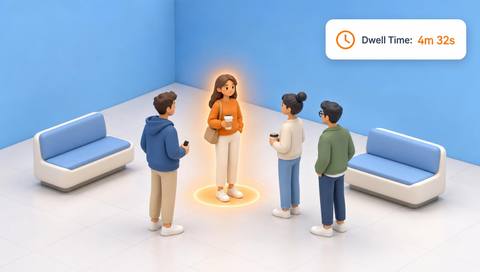
People CountingExamine duration within a specific area rather than aggregate color.
Read More
 People Counting
Review occupancy over time alongside spatial activity.
Read More People Counting
Compare selected periods using consistent map definitions.
Read MoreEXPLORE WHAT’S POSSIBLE
01 / 04 · VISITOR-ACTIVITY HEATMAPS
A team wants to compare two display positions.
Example event: One area accumulates more observed dwell during comparable trading periods.
Operator response: Staff review visibility and promotions before moving the display.
Practical value: The layout discussion uses a defined spatial measure.
Discuss this capability02 / 04 · VISITOR-ACTIVITY HEATMAPS
Visitors gather near a narrow exhibit approach.
Example event: Repeated observed dwell concentrates in the approach zone.
Operator response: The planner checks tour timing and circulation footage.
Practical value: An obstruction can be investigated without assuming exhibit preference.
Discuss this capability03 / 04 · VISITOR-ACTIVITY HEATMAPS
Guests appear to hesitate before locating reception.
Example event: Movement samples repeatedly cluster near an unsigned junction.
Operator response: The manager reviews footage and tests clearer wayfinding.
Practical value: A specific navigation issue becomes testable.
Discuss this capability04 / 04 · VISITOR-ACTIVITY HEATMAPS
Prefer a stable elevated view that includes the routes being compared.
Visibility: Dense crowds and hidden floor areas can distort the spatial distribution.
Configuration: Confirm tracking, aggregation, time windows and visitor-classification support.
Privacy: Prefer aggregate analysis; avoid linking movement to identity unless separately justified and authorized.
Human review: Check operational context before inferring what a spatial pattern means.
Discuss this capabilityFrequently asked questions
Visitor-activity heatmaps summarize where observed visitor movement or dwell accumulates within a defined camera view and reporting period.
No. It may reflect congestion, waiting, staff activity or camera coverage. Review the context.
Only if a separately validated counting method supports that measure. Movement samples and dwell are different quantities.
That requires a supported and validated distinction. Without it, describe the output as observed people activity.
Only after accounting for coverage, scale, perspective and aggregation. Separate views are not automatically comparable.
Find your fit
Compare the use of visitor-facing areas without interpreting activity as customer intent. For Retail operations teams, Venue planners, Visitor-experience managers.
Workflow to discuss
Visitor-activity heatmaps + Compare how defined visitor areas are used.
Discuss a camera view, a monitoring question and the review process your team needs.





