
 Download IVISION Catalog
 01
01Prepare the view
Map physical sites, camera ownership and the teams that need access.


A useful camera estate needs meaningful names, location context and clear responsibility. The reviewed portal contains camera records, company-scoped data and permission checks. Confirm how physical sites, users and any cross-site views are represented in the proposed deployment; company tenancy alone does not establish a fully federated control room.
Catalog workflow. Confirm detector availability, permitted use and event delivery for the proposed deployment. Website examples are illustrative.
Review your site structure
 Without IVISIONStandard CCTV feed
 With IVISIONIllustrative event overlay
The Process
Define access and ownership before expansion. Make camera ownership and access understandable as the estate grows.
01Map physical sites, camera ownership and the teams that need access.
 02
02Confirm how that structure fits the supported company, location and permission model.
 03
03Validate camera access and event visibility with representative user roles at each site.
 04
04Document administration, onboarding and change-review responsibilities before expanding.
Explore Your Options
| Dimension |  Multi-site and multi-camera management Multi-site and multi-camera management |  Search by location, camera, date or time Search by location, camera, date or time |
|---|---|---|
| Observation |  Camera records and their available events are presented within an authorized organizational scope. Camera records and their available events are presented within an authorized organizational scope. | An operator selects available event metadata rather than triggering new detection. |
| Event criteria | An authorized user selects or manages cameras through supported portal workflows. | Apply permitted camera, location and time criteria to an accessible event collection. |
| Monitoring setup | Define naming, site relationships, user permissions, stream access and operational ownership. | Use correct time zones, camera labels and permissions; widen uncertain intervals deliberately. |
| What it cannot establish | Cross-site aggregation, federation, scale limits and centralized health monitoring need confirmation. Tenant isolation is not evidence of every multi-site workflow. | Metadata filters do not search the visual contents of arbitrary recordings or prove an event did not occur. |
| Practical outcome | Give teams a consistent way to find the relevant camera and understand its organizational scope. | Begin an investigation with a manageable, explicitly defined set of records. |
Illustrative demonstration
Example footage and simulated events explain the review workflow. They do not measure detector performance.
 Sites overview
No matching events.
Area MonitoringUse consistent camera context to support scoped event review.
Read More
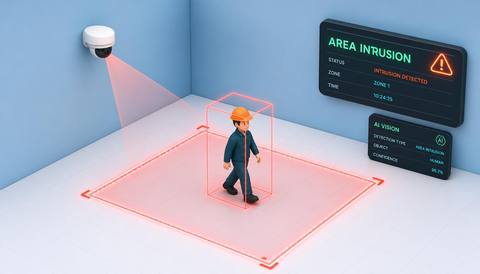 Area Monitoring
Route responses according to defined site ownership.
Read MoreArea MonitoringReview what data is actually available for an individual camera.
Read MoreEXPLORE WHAT’S POSSIBLE
01 / 04 · MULTI-SITE AND MULTI-CAMERA MANAGEMENT
Store managers and regional reviewers need different camera access.
Example event: A camera is associated with its agreed organizational context.
Operator response: Administrators test each role against the required store scope.
Practical value: Access expectations are checked before wider rollout.
Discuss this capability02 / 04 · MULTI-SITE AND MULTI-CAMERA MANAGEMENT
Similar camera names cause operational confusion.
Example event: Records use a consistent building and area naming convention.
Operator response: The operations team verifies names against physical coverage.
Practical value: Reviewers can identify the intended camera more reliably.
Discuss this capability03 / 04 · MULTI-SITE AND MULTI-CAMERA MANAGEMENT
Different customer organizations must remain clearly separated.
Example event: Camera and event access is evaluated in the appropriate company context.
Operator response: The administrator checks permissions and evidence access for each organization.
Practical value: Portfolio planning distinguishes tenancy from a shared monitoring view.
Discuss this capability04 / 04 · MULTI-SITE AND MULTI-CAMERA MANAGEMENT
Record each camera physical location, orientation and responsible team.
Visibility: Coverage remains camera-specific even when records are centrally organized.
Configuration: Confirm network reachability, supported site modeling, tenancy, permissions and deployment capacity.
Privacy: Review access boundaries and avoid unnecessary sharing between organizations or sites.
Human review: Test permissions with representative roles; do not infer access behavior from a navigation label.
Discuss this capabilityFrequently asked questions
Multi-site and multi-camera management organizes camera records, operational context and authorized access across an agreed deployment structure.
No. It establishes an organizational data boundary. Cross-site aggregation and federation require separate confirmation.
Permission behavior must be checked against the required scope. The portal has module and action checks, but any camera-level or site-level restriction should be explicitly validated.
No universal capacity is stated. Assess infrastructure, streams, processing requirements and the proposed deployment.
Do not assume universal compatibility. Validate stream access, authentication, codec and network requirements for each camera type.
Find your fit
Give teams a consistent way to find the relevant camera and understand its organizational scope. For Security administrators, Regional operations teams, IT deployment managers.
Workflow to discuss
Multi-site and multi-camera management + Establish consistent camera naming and ownership.
Discuss a camera view, a monitoring question and the review process your team needs.





