





Operational visibility
Keep permission separate from appearance.

Residents, guests and service vehicles use the same entrances, and permission changes through records that video alone cannot reveal.
Explore use casesFind your environment
Choose an environment to see the challenges, actions,
and outcomes that matter there.
Use gate and shared-road observations to support the community’s established access process. A camera event should help staff verify a visit or route condition without deciding authorization from a person’s or vehicle’s appearance.

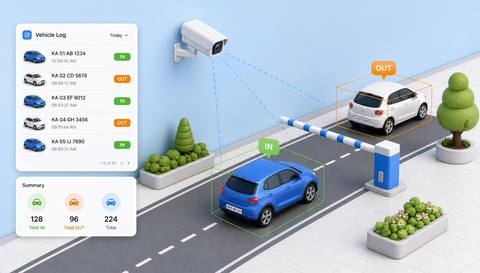 Illustrative observation
 with IVISIONIllustrative overlay
What can Vision AI help you monitor?
Keep permission separate from appearance.

Support gate-record reconciliation.

Review shared-road direction context.
Residents, guests and service vehicles use the same entrances, and permission changes through records that video alone cannot reveal.
Use the community’s approved visitor and service process.
Test queues, lighting and repeated crossings.
Staff compare observations with authorized records.
Arrival activity needs reconciliation.
Observation: A supported entry observation occurs.
Response: Check the visitor or resident access record.
Value: Support gate review.
A vehicle travels against the planned direction.
Observation: A candidate direction event appears.
Response: Review footage and the community procedure.
Value: Focus a traffic check.
A gate remains visibly open.
Observation: The supported state persists.
Response: Inspect the gate and current activity.
Value: Support access follow-through.
Camera view: Avoid private homes and unnecessary neighboring-road capture.
Validation: Validate vehicle observations and any identification integration separately.
Privacy: Limit plate and visitor data to the access purpose.
Human review: Authorized gate staff confirm access and response.
No. Current authorization must be checked through the approved process.
No. Appearance does not establish risk or intent.
No. Latching and control status require separate checks.
Gate-control integration requires separate validation and authorization.
See it in action
Illustrative observationRecords supported vehicle crossings at designated entry and exit points with their available timestamps.
Scenario selector
Review supported gate observations alongside approved access records.

Check candidate movement against a defined shared-road direction.

Observe visible pedestrian-gate position.
Fit with your environment
Industrial district
No events match this filter.
Use case finder
Tell us about your environment, priority, and cameras. We’ll shape a practical starting point in three steps.
Question 1 of 3
Prefer to look around first? See every use case we offer

Discuss a camera view, a monitoring question and the review process your team needs.
 Sites overview
 3 illustrative sites